
TuneCable iMusic Converter
Are you frustrated with no access to the downloaded Apple Music playlists after your subscription expires? You may consider why you can't have the songs you've paid for. This is because the Apple Music songs are protected by DRM. Don't worry! In this article, we tested 8 popular Apple Music playlist downloaders. We compared the differences among the working tools and listed their respective pros and cons. Pick the one that suits you best so you can listen to the downloaded playlists even if your subscription has expired!
 Which One to Choose: Apple Music vs. TuneCable iMusic Converter vs. Online Download Sites Part 1: Most Recommended Apple Music Playlist Downloader 👍 Part 2: Online Apple Music Song Downloaders Part 3: Comparison Between Apple Music Playlist Downloaders Part 4: Online Free Apple Music Playlist Downloaders (Broken) to Avoid in 2026 FAQs About Apple Music Playlists
 Which One to Choose: Apple Music vs. TuneCable iMusic Converter vs. Online Download Sites
Before deciding which tool to use for downloading Apple Music playlists, let's briefly compare the download features of the Apple Music app, desktop converters like TuneCable iMusic Converter, and online download tools.
| Apple Music App | TuneCable iMusic Converter | Online Download Sites | |
|---|---|---|---|
| Max Quality | Hi-Res Lossless (24-bit / 192 kHz) | Hi-Res Lossless (24-bit / 192 kHz) | 320kbps(*claimed) |
| Output Format | DRM-protected AAC/ALAC | MP3, AAC, ALAC, FLAC, WAV, AIFF | MP3/M4A |
| Batch Download | ✔ One-tap to download 1 playlist | ✔ Download multiple Apple Music playlists at once | ❌ |
| Offline Playback on Any Device | ❌ (Only in the Apple Music app) | ✔ | ✔ |
| Keep Apple Music Playlist Forever | ❌ (Inaccessible after subscription expired) | ✔ | ✔ |
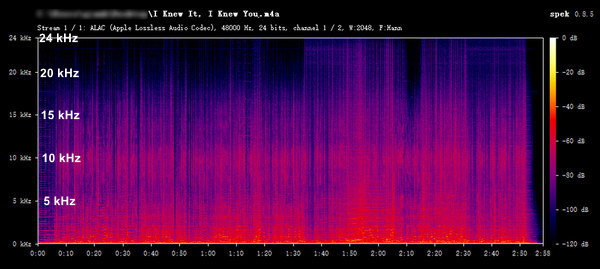
Part 1: Most Recommended Apple Music Playlist Downloader 👍For a good Apple Music playlist downloader, batch downloading, fast conversion, and audio quality of downloaded songs are essential. The program we recommend today can meet all these requirements. TuneCable iMusic Converter can help you download Apple Music playlists in one click at up to 10 times the speed, saving a lot of time. In addition, it can maintain the original sound quality of Apple Music and preserve metadata. Since TuneCable uses advanced decryption technology, the downloaded songs will not be protected by DRM. And, you can transfer any song downloaded using TuneCable to other devices or programs for use.
TuneCable iMusic Converter
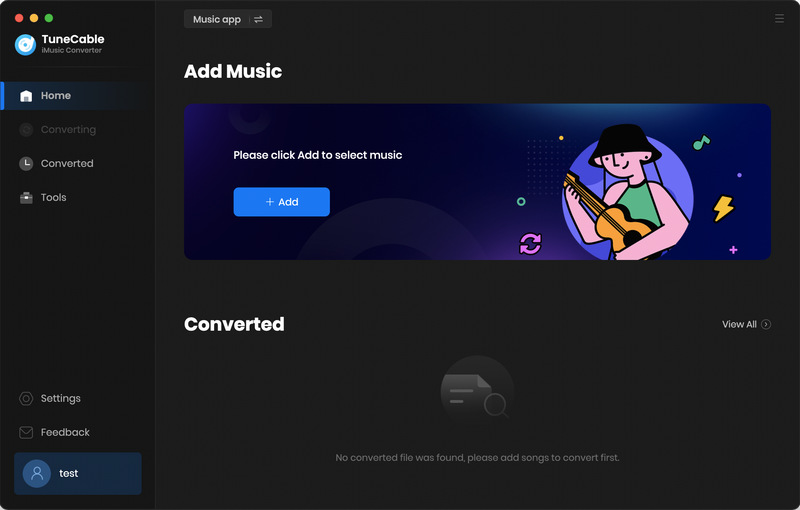
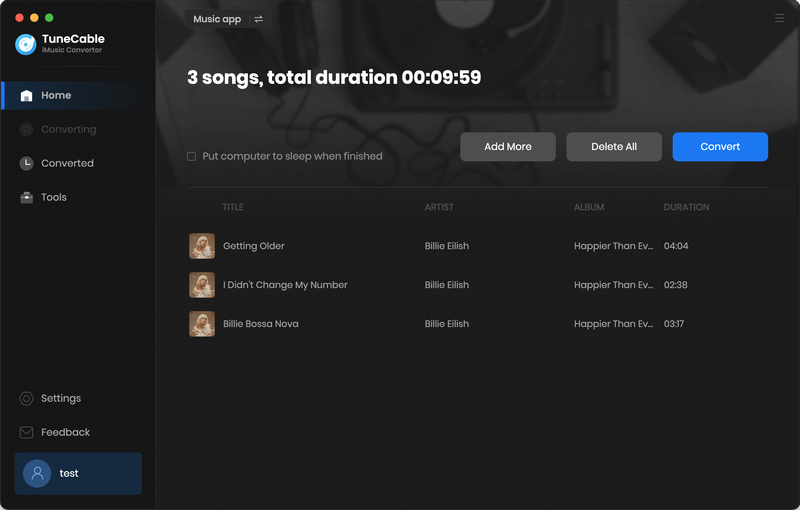
Step 1 First, please download and install TuneCable Apple Music Playlist Downloader on your computer. When you launch it, you will see the following interface. You can change the audio source to convert from by clicking "Music App" or "Apple Music web player". For a faster conversion speed, we recommend converting from the Apple Music web player. For a higher audio quality, converting from the Music App is recommended.
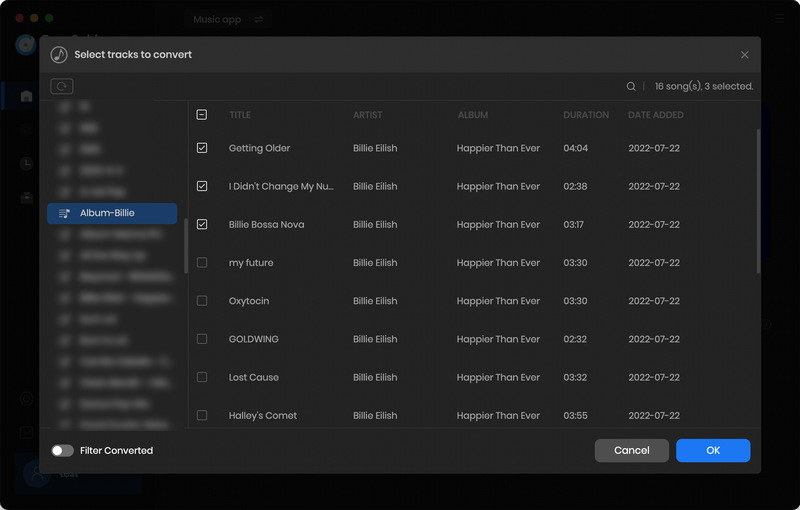
Step 2 Here, we will take Music app as an example. Go to TuneCable and hit "Add". It will bring up a window. Please check the boxes in front of the songs you want to download and click "OK" after selecting them.
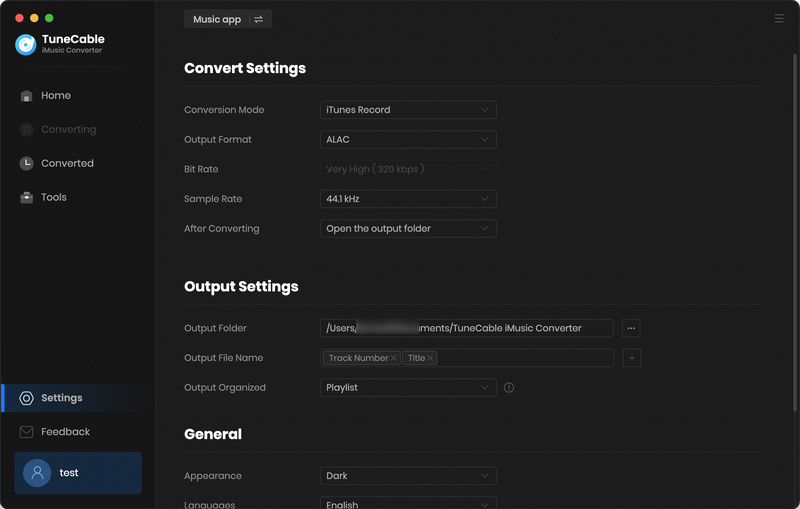
Step 3 After adding songs, you will see some buttons. Please click "Settings" to make some changes. Here you can modify the "Output Format"(MP3, AAC, WAV, FLAC, AIFF, or ALAC), "Conversion Mode", "Bit Rate" (128 kbps, 192kbps, 256kbps, or 320kbps), "Sample Rate", and "Convert Speed". You can also modify the output folder name and organize the downloaded Apple Music playlists.
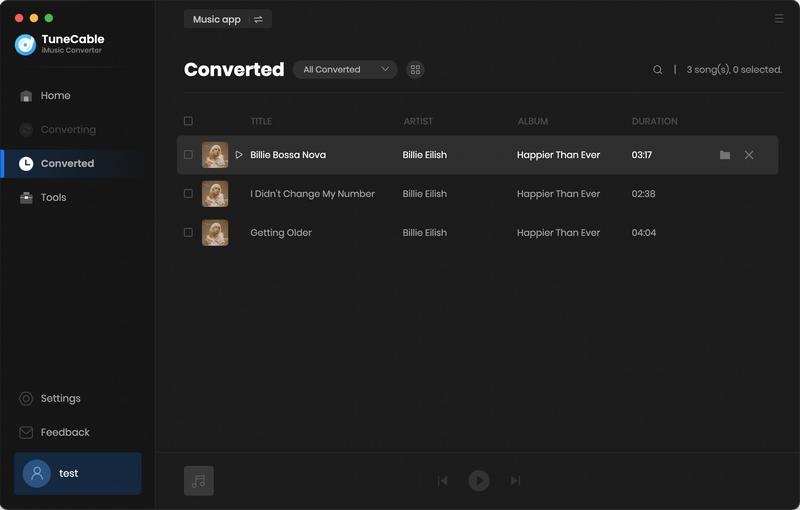
Step 4 When you finished modifying the settings and closed the window, you can click "Add More" to add songs from different playlists to convert with one click. Or click "Convert" to start the conversion. Wait for some time, and TuneCable will download Apple Music playlist to computer. Please check it on the "History" module.
 Part 2: Online Apple Music Song Downloaders
AAPLmusicdownloader is one of the popular online Apple Music playlist downloaders. With it, you can download Apple Music playlists, tracks, and albums to your local devices. This website is free to use, but if you want to batch download, you need to subscribe; otherwise, you can only download two songs at a time or manually download the songs in the playlist one by one.
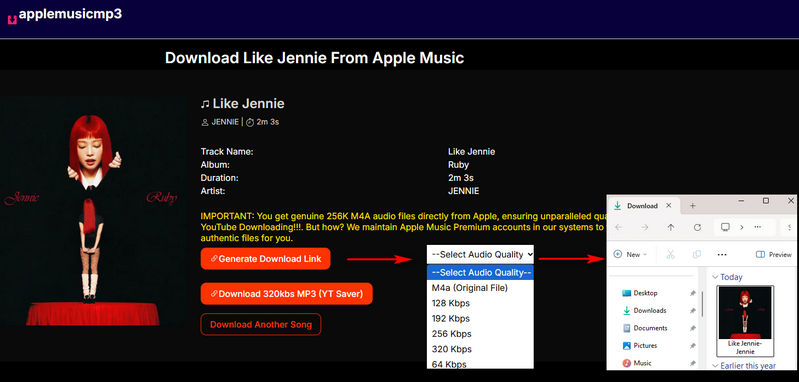
Step 1 Open Apple Music, find the playlist you want to download, and copy its URL. If you need to download a private playlist, click "Share" and copy the share link.
Step 2 Paste the copied URL into the search box in the middle of the webpage and click "Download".
Step 3 Wait for a minute, and you will be guided to a new page where a download link has been generated. Click on it and you can choose the output format and bit rate.
Step 4 Then, the Apple Music playlist will be downloaded. You can check it in your "Downloads" folder.
How to download Apple Music playlist to MP3? APLMate is also a good helper. As a free online tool, users don't need to spend a penny and don't need to download software. Just open this Apple Music Song Downloader in your browser, enter the URL of the Apple Music playlist, and you can download songs from Apple Music.
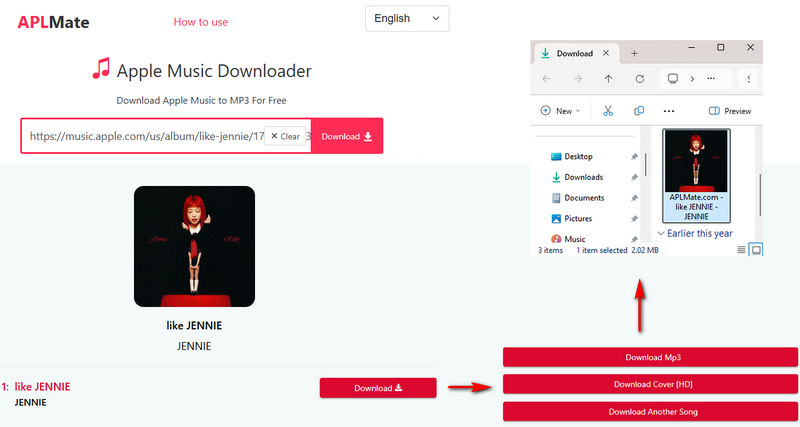
Step 1 First, you need to copy the URL of the Apple Music Playlist to prepare for downloading Apple Music playlist. (*Note: Only public Apple Music playlists can be parsed successfully.)
Step 2 When you open APLMate in your browser, enter the URL into the search box and click "Download".
Step 3 Click "Download Mp3" and you can download Apple Music playlist to computer. Cover art, title, artist, and album will be preserved.
 Part 3: Comparison Between Apple Music Playlist Downloaders
| TuneCable iMusic Converter | AAPLmusicdownloader | APLMate | |
|---|---|---|---|
| Ads-free | ✔ | ✔ | ❌ |
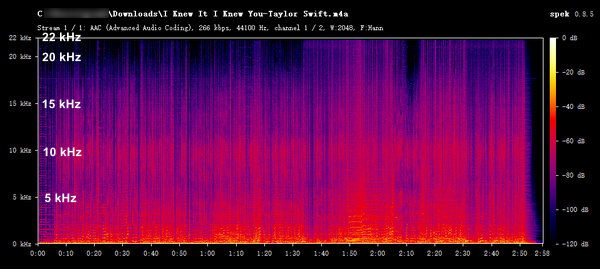
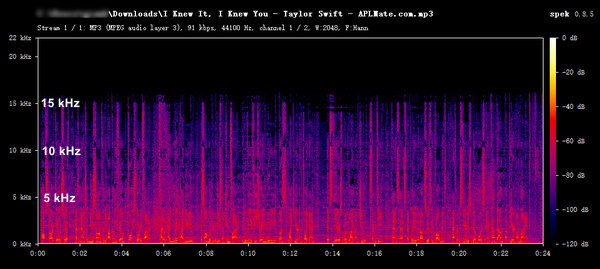
| Audio quality | Apple Music Lossless | Up to 320 kbps (*claimed) | Up to 320 kbps (*claimed) |
| Output Format | MP3, AAC, WAV, FLAC, AIFF, and ALAC | MP3, M4A | MP3 |
| Input Source | Apple Music web player, and iTunes / Music App | Apple Music web player/YouTube | Apple Music web player/YouTube |
| Metadata | Album, artist, year, cover art, and title | Cover art, title, artist, year | Cover art, title, artist, and album |
| Batch download | ✔ | Yes, but premium users only | ❌ |
Part 4: Online Free Apple Music Playlist Downloaders (Broken) to Avoid in 2026 We also tested 5 other popular free online Apple Music playlist downloaders. Unfortunately, none of these tools worked properly. Below are our test results. If you encounter any of these tools in the future, you can abandon them immediately and not waste your time trying them.
| Tool | URL | Test Result |
|---|---|---|
| Apple Music to MP3 Downloader | https://apple-music-downloader.com/ | It successfully parses Apple Music playlist URLs, but fails to download the MP3s, displaying either a "Failed" status or a "Network error. Please try again later" message. |
| KEEPVID | https://keepvid.ch/apple-music-new4 | Failed to parse the Apple Music playlist, with the message: "Please paste a valid link!" |
| Free Online Music Downloader | https://www.acethinker.ai/music-downloader | This is a fake tool. Clicking the download link will redirect you to the installation package for a piece of software. |
| apple-playlist-downloader-pvx.onrender.com | https://apple-playlist-downloader-pvx.onrender.com/ | Failed to parse the Apple Music playlist. A "NOT FOUND!" notification appeared. |
| Pastedownload | https://pastedownload.com/apple-music-downloader/ | Public Apple Music playlists can be successfully parsed; however, after clicking the download button, the process remains stuck in a loading state, and the download fails to complete. |
FAQs About Apple Music PlaylistsYes, only with an active subscription.
All Apple Music downloads are protected by Digital Rights Management (DRM), which ties them to your subscription. If you cancel your subscription, the downloaded content will not be playable. To avoid this limitation, you can use TuneCable iMusic Converter to download. All downloaded music is in plain formats and will be stored on your device permanently, even after your subscription expires.
TuneCable iMusic Converter is a professional Apple Music playlist downloader. It can keep the original quality of Apple Music and save Artwork and Metadata.
ConclusionIn this article, we tested 8 Apple Music playlist downloaders. Only 3 of them are currently working, and we compared these 3 remaining tools. Overall, we recommend TuneCable iMusic Converter the most. In addition to downloading Apple Music playlists to MP3 format, it can also output to AAC, WAV, FLAC, AIFF, and ALAC formats. Additionally, it supports one-click downloading and offers up to ten times the download speed, saving users a significant amount of time. If you are interested in it, please click the download button and try it out!
 What's next? Download TuneCable iMusic Converter now!

Ava Morrison | Senior Writer


