TuneCable Spotify Downloader
 >
How To >
>
How To >
Ever since Spotify launched lossless audio in 2025, I have been searching for a tool that is capable of downloading Spotify tracks in true Lossless quality in FLAC format. During my search, TuneCable Spotify Downloader caught my eye. Like many cautious consumers, I scoured Google for reviews and genuine user feedback. The opinions were mixed, leaving me confused. Some users gave it five stars, praising its ability to download authentic Spotify lossless FLAC files, while others vehemently criticized it.
Driven by curiosity, I decided to purchase the software and try it out myself to bring a 100% first-hand and real report, covering core features, actual test results, as well as user complaints and the facts behind them. So, what was the verdict? Is TuneCable Spotify Downloader worth buying in 2026? Let's take a closer look.
TuneCable Spotify Downloader is designed for desktop (Windows & Mac) and mobile (Android) users to download Spotify tracks, playlists, albums, podcasts, audiobooks, music videos, and more. Unlike the cached files locked inside the Spotify app, the TuneCable desktop version enables users to download and save their favorite Spotify content to their computers in standard, widely compatible formats, including MP3, FLAC, AAC, ALAC, AIFF, and WAV. For Android users, the app supports downloads in MP3, FLAC, AAC, or WAV formats.
Beyond its format flexibility, TuneCable also stands out for its accessibility as it works with both Premium and free Spotify accounts, and users can even download Spotify music without logging in at all.
| Test Metric | Official Specifications | Test Result (App Mode) | Test Result (Web Player) | My Final Conclusion |
|---|---|---|---|---|
| Highest Quality | Spotify Lossless (24-bit/44.1kHz) | 24-bit / 44.1kHz FLAC | 44.1kHz / 256kbps AAC | True lossless audio (via Spotify app, record mode), depending on the source audio—a Premium account is required. |
| Conversion Speed | Adjustable: 1X, 5X, 10X | Select 5X and 10X | 10X (not selectable; depends on actual network conditions) | Speed meets expectations. For large playlists, 5X is recommended for stability. |
| Actual Processing Duration | ~11 min 28 s (~5.9X) | Choose 5X: 13 min Choose 10X: 8 min 15 s |
~8 min 30 s (~8X) | Although the download speed did not reach 10X during testing—likely due to network instability—the overall conversion efficiency remained high, and the batch downloading experience was excellent. |
| ID3 Tags | Full metadata retention | ✅Complete metadata (cover art, artist, album, year, track number, etc.) | ✅Full metadata | Metadata is perfectly preserved, including support for synchronized lyrics (.lrc). |
| Batch Download | ✅ | ✅ | ✅ | Supports one-click batch downloading of multiple playlists, making the process highly convenient. |
| Success Rate | Very High | 100%: 18 tracks all downloaded | 100%: 18 tracks all downloaded | Overall stability is strong, with consistently successful batch processing results. |
*Note: The test sample for this review was Drake's album ICEMAN.
TuneCable offers two download sources on its desktop version, namely the Spotify app and the Spotify web player. As is well known, streaming via the Spotify app supports up to Lossless FLAC quality (44.1kHz/24-bit), whereas the web player is limited to 256kbps AAC. Most competing Spotify downloaders only support downloading music from the web player, making it impossible for them to achieve true lossless output. TuneCable, however, differentiates itself by enabling downloads directly from the Spotify app, thereby delivering authentic Lossless FLAC quality.
TuneCable Spotify Downloader supports download speeds of up to 10X for both app and web player modes. When downloading via the Spotify app, users can adjust the speed (1X, 5X, or 10X) while retaining Spotify's maximum audio quality, perfect for audiophiles. For web player downloads, a quick, hassle-free choice, users don't even need to log in or have the Spotify app installed, and it also supports downloading music videos.
TuneCable Spotify Downloader claims to download music in true Spotify Lossless quality, with an impressive 44.1kHz/24-bit sample rate and bit depth. However, during my testing, I noticed that not all FLAC outputs from the ICEMAN album were the same—some tracks came out as 44.1kHz/16-bit, while others were 44.1kHz/24-bit.
I reached out to the TuneCable technical team to report what I found. It turns out that the output specifications depend entirely on the original Spotify source material, and specifically, the source audio for some tracks on the album is 44.1kHz/16-bit. To obtain 24-bit lossless FLAC audio files, you must confirm that the original source material is available at that quality tier before downloading.
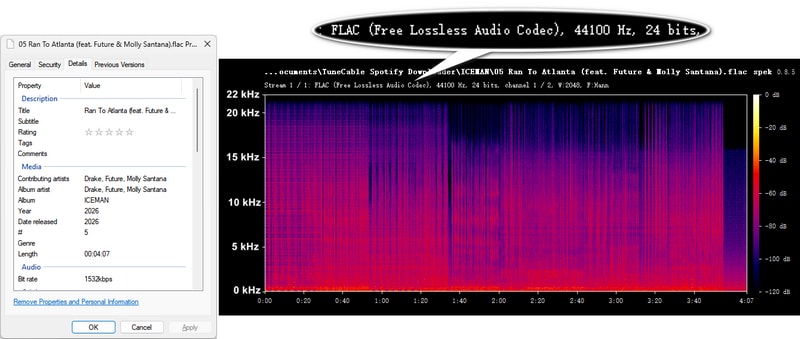
TuneCable claims to preserve full ID3 tags, lyrics files, and cover art. After completing the download test, I carefully checked the output FLAC files and found that metadata, such as song title, artist, album name, release year, and track number, were fully preserved, along with the album cover. Additionally, the TuneCable settings window features a "Save lyrics" button that allows users to download lyrics as local .LRC files, perfect for karaoke enthusiasts to sing along. And the test results confirmed that the lyrics were indeed successfully downloaded to the local drive.
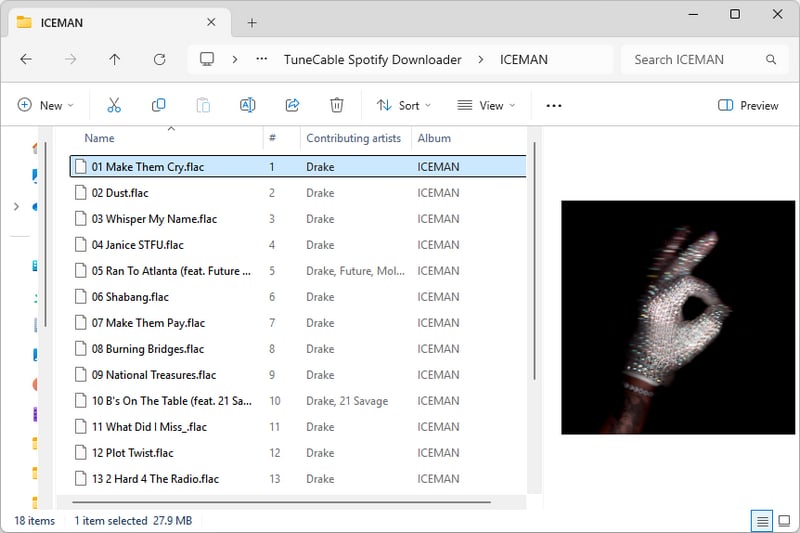
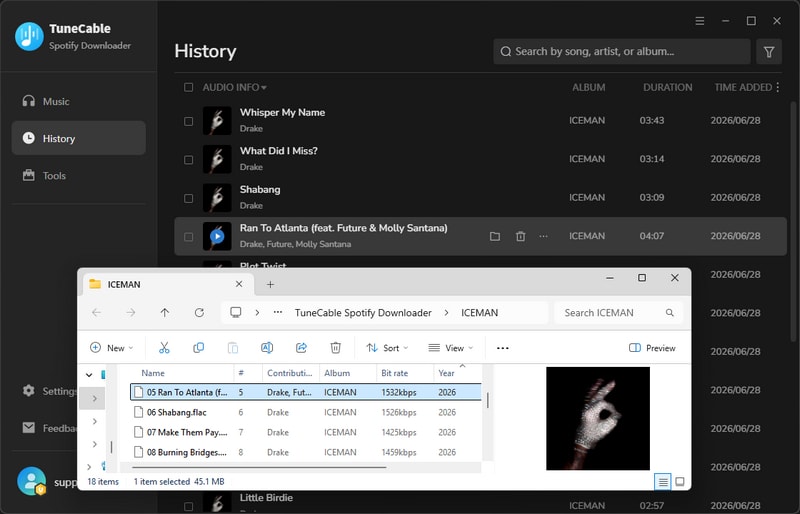
Another feature of TuneCable Spotify Downloader that impressed me is its support for custom filenames and output file organization. You can name the output file by Track Number, Title, Artist, Album, Playlist Index, Year, Disc Number. For example, I set "{Track Number} {Title}" to download the entire album, and I get the following files as a result. Alternatively, downloaded files can be organized by Playlist, Artist, Album, Genre, Year, and Disc Number. In my test, I selected "Album" from "Output Organized", so all 18 songs downloaded were stored in a folder named "ICEMAN".
Besides its core music download function, TuneCable Spotify Downloader includes several very useful audio tools, such as a tag editor that supports modifying metadata of the local audio files, a format converter for converting local audio to MP3, M4A, FLAC, WAV, AIFF, or OGG format, a CD burning feature for burning high-quality tracks to CDs, an AA/AAX converter, an audio editor, as well as a convenient tool for exporting audio to iTunes or Music apps. TuneCable basically packs all the handy tools you need into one place. It covers pretty much everything I use on a daily basis, which makes it super convenient overall.
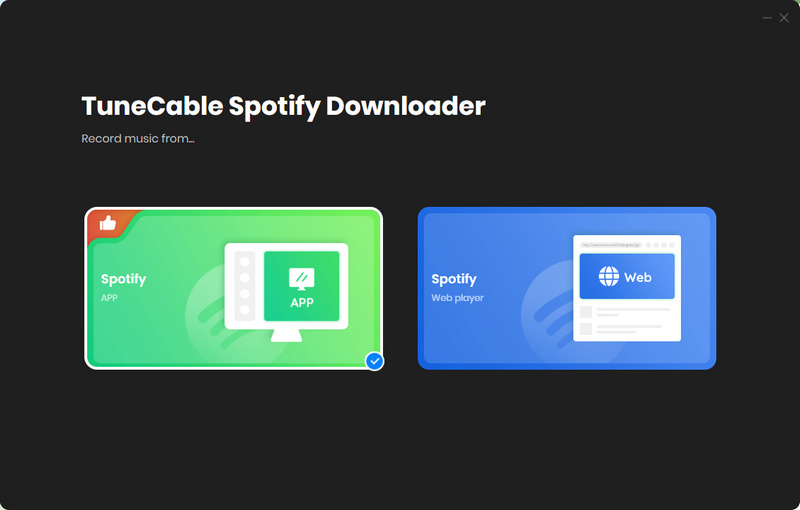
Step 1 Launch TuneCable and select "Spotify App" from the top left corner. Log in to your Spotify Premium account. Set the streaming quality to Lossless within the Spotify app.
Step 2 Find the song with the Lossless (44.1kHz/24-bit) original audio source and click the floating "+" button. Select the needed songs and click "Add".
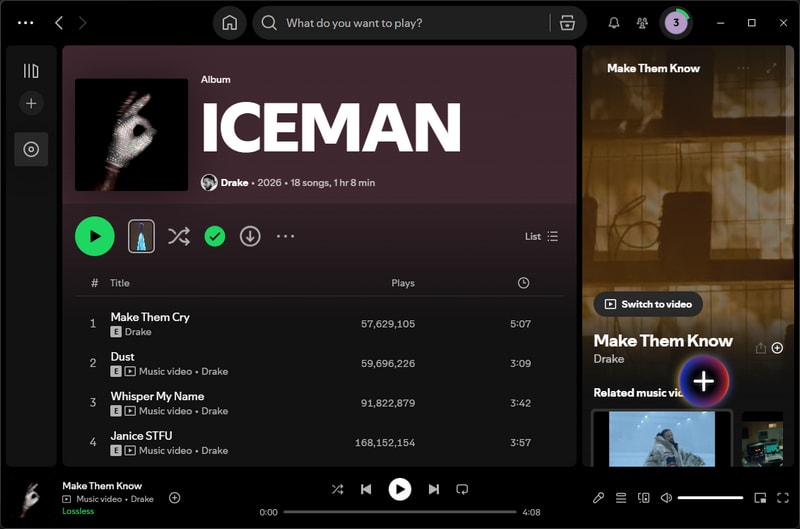
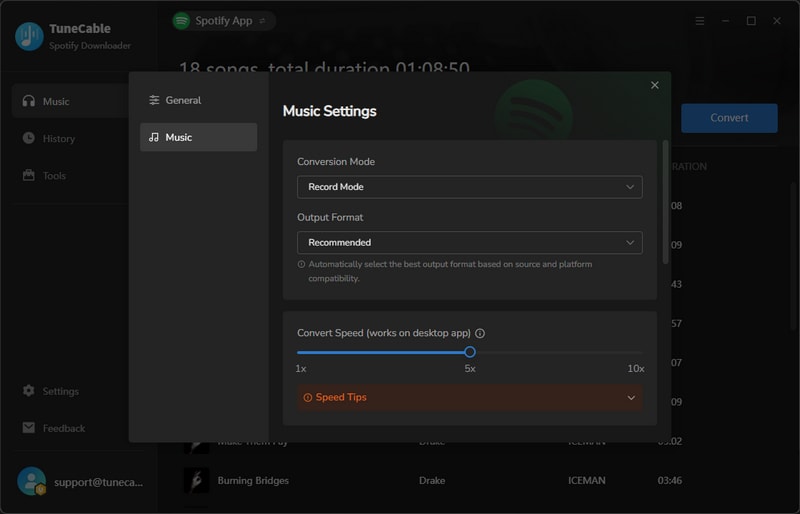
Step 3 Click "Settings", select "Record Mode" for the conversion mode, and "Recommended" for the output format. In this case, TuneCable will download the highest audio quality offered by the Spotify app by default. Additionally, I recommend selecting 5X for the download speed.
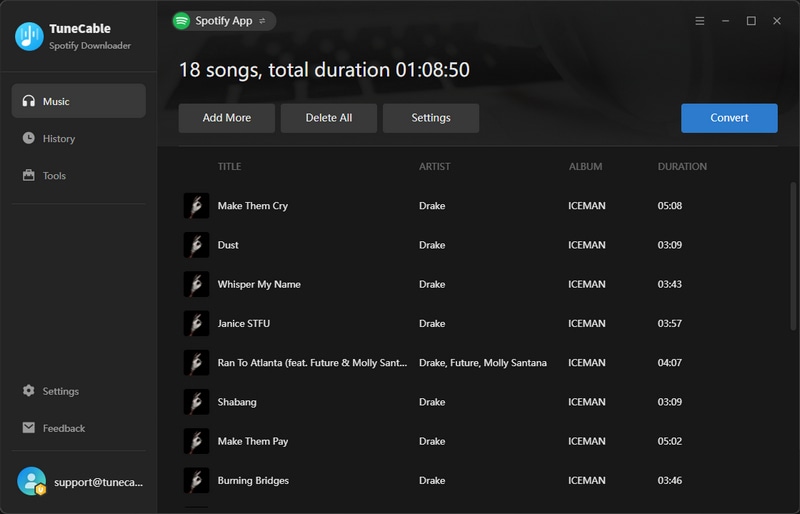
Step 4 Click "Convert" to start the download. After the download is complete, you can view the downloaded tracks in "History".
Finally, I used Spek to analyze one of the FLAC output files downloaded via TuneCable. The file presents a 44.1 kHz sample rate paired with 24‑bit bit depth. The spectrogram shows the audio signal extends to nearly 22kHz, only starting to attenuate noticeably around 21.5kHz. Based on spectral analysis, this file can be verified as an authentic lossless FLAC.
After putting TuneCable Spotify Downloader to the test, I was really surprised. It turned out to be far more capable than I expected. The results were so solid that I found myself double-checking the criticisms I'd read about TuneCable. So I rounded up the most common negative reviews and put them side by side with my actual experience.
What Users Say: Some of the one-star reviews came from users claiming their Spotify accounts got banned after using TuneCable to download music.
What I Found: As of now, my Spotify Premium account is still in good standing. Obviously, my experience clearly doesn't match what some other users have reported. So, I reached out to TuneCable's customer support for clarification, and they explained that the suspensions are random and may be caused by various factors. There's currently no direct evidence linking these suspensions to the use of TuneCable.
However, account security is indeed one of the major concerns for users, and on that front, I found TuneCable to be remarkably understanding. They've actually rolled out a series of measures to safeguard users' account data:
On the whole, I think the customer support team is forthcoming and responsible. For any account‑related questions, users can reach out to them for expert guidance and assistance.
What Users Say: Some users complained that the trial version of TuneCable could only download the first minute of a song. These user complaints are understandable. A one-minute audio clip cannot fully demonstrate the capabilities of TuneCable.
What I Found: Upon reviewing TuneCable's refund policy, I noted that subscription‑based products include a 5‑day money‑back guarantee, while lifetime licenses include a 30‑day guarantee. That said, users can request a refund within the refund period if they are not satisfied with the product. And honestly, that speaks volumes about TuneCable—they clearly believe in their product and actually give users a fair chance to decide if it's right for them.
What Users Say: While TuneCable's customer support team is professional and eventually resolves issues, some users express frustration over response time.
What I Found: I went through TuneCable's negative reviews on Trustpilot and found that TuneCable replied to every single one with detailed, helpful solutions. To me, time zones may cause delays in customer service response, but they always respond—within 48 hours, as promised. As for my own experience, I thought they ignored me at first when I sent an email to inquire, but it turned out their reply was in my spam folder, and they actually replied to me within 12 hours. Though it's not as instant as a phone call, the customer support team didn't feel like soulless robots. They were real professionals who actually helped me get my issues sorted.
What Users Say: Some users have reported not receiving registration information promptly after completing their purchase.
What I Found: I read TuneCable's FAQ page carefully, and noticed that their first FAQ is about what to do if you do not receive the registration information email.
They explained that normally, users will receive registration information and a confirmation email immediately after payment. If you don't receive them, they may have been mistakenly flagged as spam. You may check the spam folder. If there are also no relevant emails in your spam folder, it's possible the order wasn't completed, or you entered the wrong email address when making the purchase. In this case, you may contact customer service and provide them with your receipt, order number, and other information so they can locate your order and assist you.
After my thorough testing, I believe TuneCable is well worth the investment. It boasts powerful performance, enabling batch downloads of true Spotify Lossless 44.1kHz/24-bit FLAC audio, reliable account security support, and a professional and responsive customer and technical support team.
While the software impresses in many aspects, it's not 100% perfect. Here's my honest take on its pros and cons.
Pros
Cons
Final Verdict: All in all, TuneCable Spotify Downloader is absolutely worth picking up in 2026. It's perfect for audiophiles, karaoke enthusiasts, users with bulk download needs, and those who prioritize account security. While it might not be the best option for light users who only download a few songs occasionally, TuneCable's ability to download music without logging in and without installing the Spotify app is still well worth a try for them.
 What's next? Download TuneCable Spotify Downloader now!