TuneCable Apple Music Converter
 >
How To >
>
How To >
Hi-Res lossless audio is now the gold standard in digital music. Many streaming services like Apple Music, Amazon Music, and Tidal offer amazing sound quality nowadays, but our favorite tracks can be removed at any time once the subscription or license expires. And for most of us, there's still one nagging problem: how do we permanently keep our music collections saved on our own devices?
More and more Apple Music listeners are searching for a reliable way to download and preserve Hi-Res music locally, and TuneCable iMusic Converter is one of the hot picks. Is it really capable of exporting 100% original ALAC lossless music, or is it just an overrated recording tool? Is it worth it? Today, we bring you the most comprehensive and honest test data, along with a firsthand, in-depth review.
TuneCable iMusic Converter is designed for downloading Apple Music songs, albums, playlists, podcasts, audiobooks, and more, to plain formats like MP3, AAC, ALAC, FLAC, AIFF, and WAV. What sets this Apple Music Converter apart is that it enables downloading Apple Music tracks at up to 3730 kbps, a big draw for lovers of high-resolution audio. It not only preserves lossless audio quality but also retains complete ID3 tags and lyrics files. More importantly, it can batch download music at a speed of up to 10X, making it extremely efficient.
For a piece of software, its true capability speaks through real data. Below are the performance test results we conducted on TuneCable iMusic Converter under Windows 11 and macOS 26. Here's a sneak peek for you.
| Test Metric | Official Statement | Real Test Results (macOS 26) | Real Test Results (Windows 11) | Final Conclusion |
|---|---|---|---|---|
| Highest Audio Quality | Lossless | 3730 kbps | 256 kbps | Perfectly preserves the original lossless audio quality. |
| Maximum Conversion Rate | Up to 10X | 1X (More stable) | 10X | Download time is significantly reduced on Windows, while lossless sound quality is guaranteed on Mac. |
| Actual Processing Duration | — | 2:58 | 0:18 | Processing time varies depending on system load and network conditions. |
| ID3 Tags | ✅ Up to 10 types | ✅ Title, Artist, Album, Artwork, Track number, Disc number, etc. | ✅ Full metadata support | Metadata is perfectly preserved across both platforms. |
Note: The streaming source used in the test was an officially certified Hi-Res Lossless track, I Knew It, I Knew You.
TuneCable offers six output formats, supporting the saving of Apple Music tracks as MP3, AAC, ALAC, AIFF, WAV, and FLAC, giving users great flexibility in using the downloaded files. Unlike Apple Music's built-in download function—which downloads tracks as cached files—TuneCable truly allows users to save their favorite music locally for offline playback anytime, anywhere.
TuneCable iMusic Converter allows for batch downloading of Apple Music albums, playlists (both public and user-created), podcasts, and more. Simply select the tracks from the Library to add to the download list, then click to batch download them to the local computer. When downloading music via the Apple Music web player, conversion speeds can reach up to 10X faster, and it runs in the background without any hassle, making the whole process effortless.
To make sure that customers will not be bothered by the chaos of converted songs, TuneCable iMusic Converter also offers an outstanding tag-saving function. It can retain full ID3 tags after conversion, including year, artist, album, title, track number, disc number, as well as high quality album artwork. With this song metadata preserved, we can organize the music library on the computer by different tags. This feature is especially helpful for DJs who deal with a vast music library on a daily basis, as it allows them to quickly locate tracks during remix performances and seamlessly switch between different tracks. In addition, it also supports saving lyrics files locally.
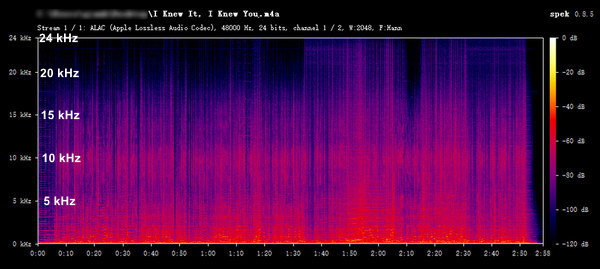
TuneCable iMusic Converter can download and save Apple Music tracks at up to 3730 kbps, a bitrate that matches or even exceeds Lossless audio quality. It should be noted, however, that this high-bitrate output is currently exclusive to downloads made through the Mac version of the Music app. All other sources remain capped at 256 kbps. Here is an example. Based on the spectrogram, it belongs to the lossless audio level of Apple Music (24-bit/48kHz ALAC).
People today expect control over their files in their own ways. TuneCable offers flexible options for defining output file naming rules and storage organization, enhancing efficiency and reducing the time spent on post-download housekeeping. It supports the following custom options:
TuneCable has a built-in multi-functional audio toolkit that includes a smart tag editor, a format converter, CD burning, an audio editor, and an AI audio splitter. Most notably, the AI Audio Splitter is completely free and can clearly separate vocals from instruments, which means you can deconstruct, remix, and reimagine your favorite songs however you like.
The installation process for TuneCable is clear and simple, free from any bundled third-party software, and fully compatible with both Windows and macOS platforms. The overall software interface is clean and intuitive, making it very beginner-friendly. You may follow these 4 steps to download Apple Music to your device and save it permanently.
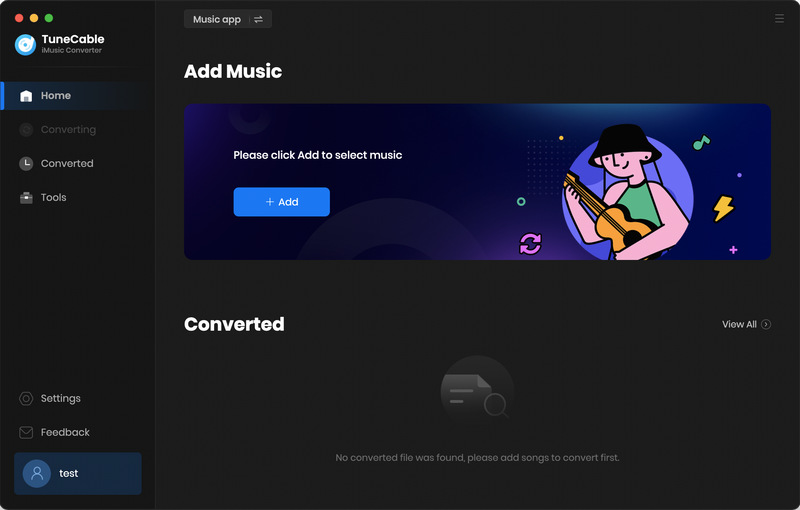
Step 1 Choose a Download Source and Log In to Apple Music Account
Choose according to your needs. Then log in with your Apple ID. We'll take the Apple Music app as an example here.
Step 2Add Songs from iTunes Music to TuneCable
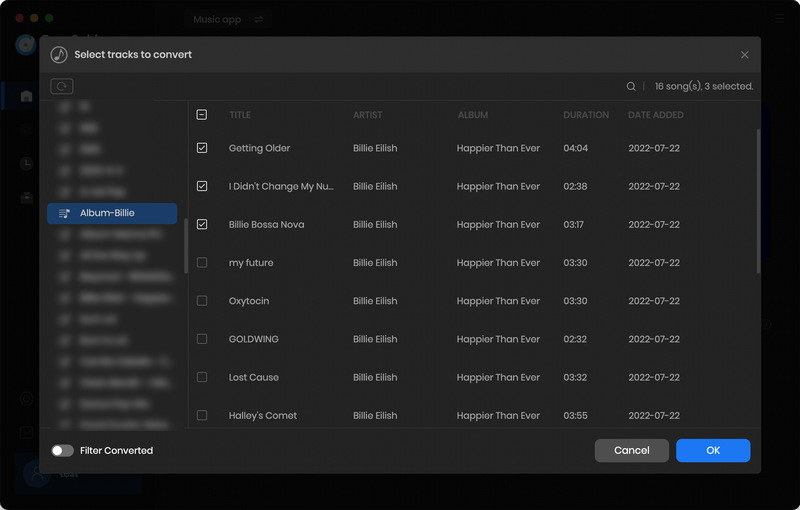
Hit "Add", choose the content you want and click "OK".
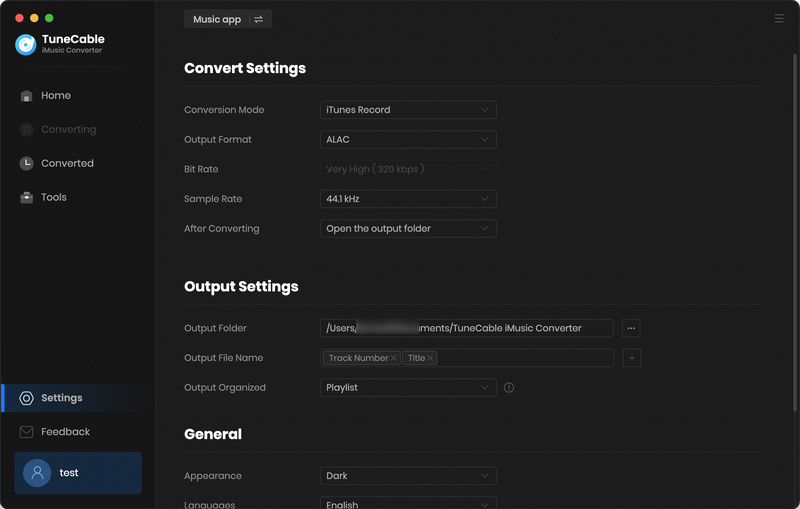
Step 3 Customize the Output Settings
To customize the output settings of TuneCable iMusic Converter, you can simply tap the "Setting" icon to choose output format, bit rate/bit depth, sample rate, output path, etc.
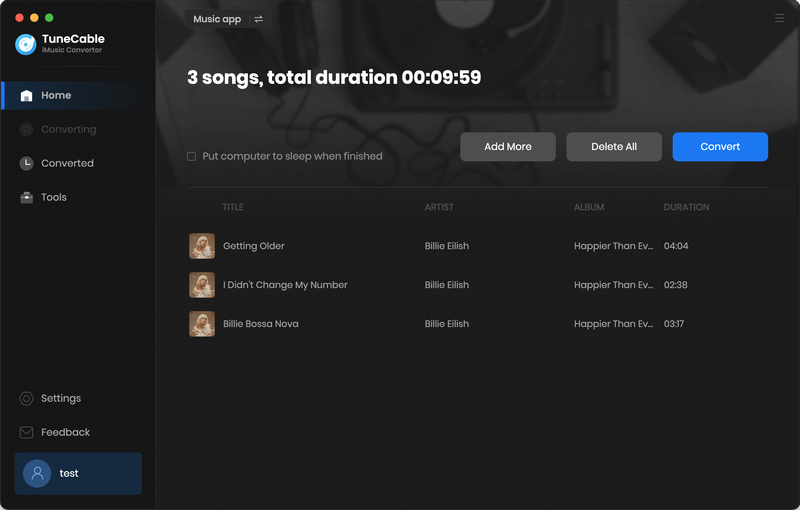
Step 4 Stream Apple Music Offline with TuneCable
Click "Convert", then TuneCable iMusic Converter will start downloading Apple Music to your PC.
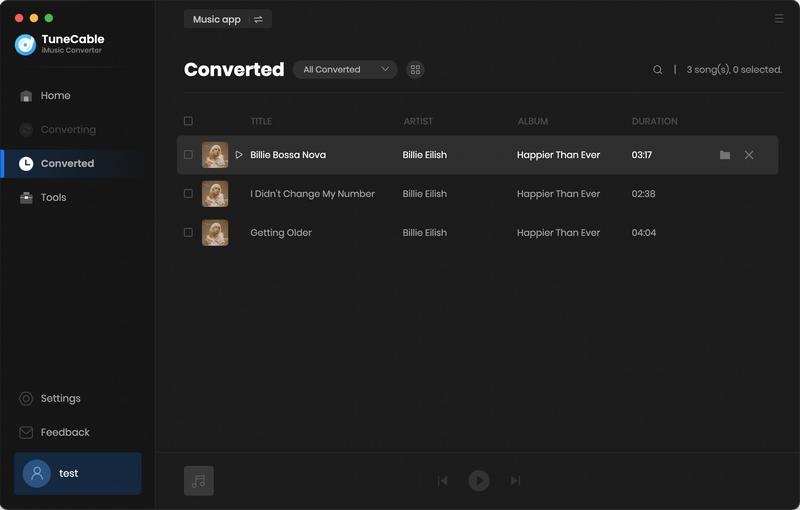
Once it has finished the whole conversion, you can navigate yourself to the "History" section. Move your cursor close to the downloaded files, then a small folder icon will appear - you can directly locate the file by clicking it.
Despite its impressive capabilities, TuneCable iMusic Converter is not without its shortcomings. However, when you search for TuneCable iMusic Converter on major search engines, there seem to be relatively few reviews about it. However, we did come across some relevant reviews for TuneCable on Trustpilot, and they're worth taking a closer look at.
1. After the music application update, TuneCable suddenly stopped working or failed to parse URLs?
Many music conversion tools may become unusable after official music app updates. This is a cat-and-mouse game between streaming media and music conversion software. TuneCable typically follows up on user feedback promptly, resolving issues by launching hotfixes or new versions.
2. Is it really possible to download Lossless audio quality from the Music app?
Some users hold a common misconception. They may have tried multiple times to download lossless audio from the Music app, but found it didn't work.
Actually, not all Apple Music tracks offer Lossless quality. Lossless output depends on the original source. So before using TuneCable iMusic Converter, you should make sure your target track is Lossless-available. Otherwise, true Lossless audio just isn't possible.
No tool is perfect, so let's take a balanced look at its pros, cons, and some general recommendations. Whether TuneCable is worth it in 2026 is ultimately up to you.
Pros
Cons
Who shouldn't buy: Light listeners who have no requirements for sound quality.
Who absolutely must buy: "Digital immigrants" who unsubscribe from Apple Music but don't want to lose their playlists; high-fidelity music collectors who pursue perfect ID3 tags and original CD covers.
Try before you buy: It is strongly recommended to test one or two songs with the free version first. Make sure your computer system is compatible with the current version of the software before considering paying.
Pay attention to subscription management: If it is for short-term use, remember to turn off automatic renewal after purchase to avoid automatically being charged for the next term.
 What's next? Download TuneCable iMusic Converter now!