
 >
How To >
Music Tips >
>
How To >
Music Tips >
Looking for a working Deemix alternative in 2026? As Deezer tightened its API restrictions and encryption, Deemix frequently runs into token errors or limits downloads to lower bitrates. Whether you are tired of constant script updates or looking for a stable way to grab Hi-Fi Deezer music, we’ve tested and rounded up the best Deezer Downloaders below. Let's dive in!

Deemix's core functionality relies on Deezer's API. If Deezer changes the API, Deemix will naturally no longer work. In addition, as a legitimate platform, Deezer has been cracking down on third-party applications such as Deemix and strengthening copyright protection measures, such as blocking APIs or restricting access, so Deemix may face legal challenges or removal requests. This will also cause the service to be temporarily or permanently unavailable.
If you want to download Deezer music to your devices but don't want to pay for the subscription, you can only use Deemix alternatives. Please continue to look at the 6 professional Deemix alternatives we introduced for you.
First of all, we would like to introduce a professional and popular music conversion tool, TuneCable BeatOne. TuneCable is designed to help people convert and download music from different streaming platforms including but not limited to Deezer, Spotify, Apple Music, Tidal, Amazon Music, Qobuz, YouTube, YouTube Music and so on. TuneCable supports song output in MP3, AAC, WAV, FLAC, AIFF, and ALAC formats and provides a batch download function. While downloading music at up to 10x speed, TuneCable maintains the original sound quality and ID3 tags of the songs, such as artist, album, etc. Consequently, TuneCable is an excellent Deemix Alternative.

TuneCable BeatOne
Now, let's download TuneCable BeatOne and follow the steps below to see how to use it!
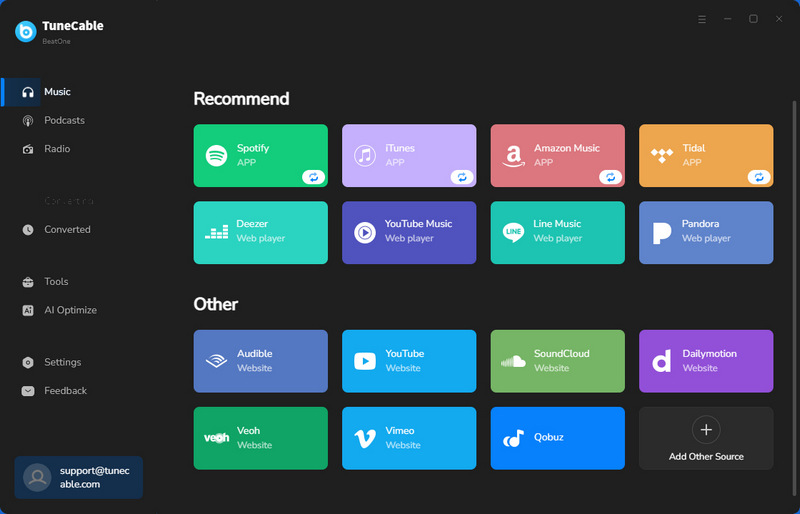
Step 1 First of all, please open TuneCable BeatOne, then you will see the interface below. As TuneCable BeatOne supports multi-platform to convert and download songs, so users can choose the streaming platform by themselves in this step. Here, please click Deezer, then TuneCable will launch Deezer web player automatically. Please login your Deezer account first.
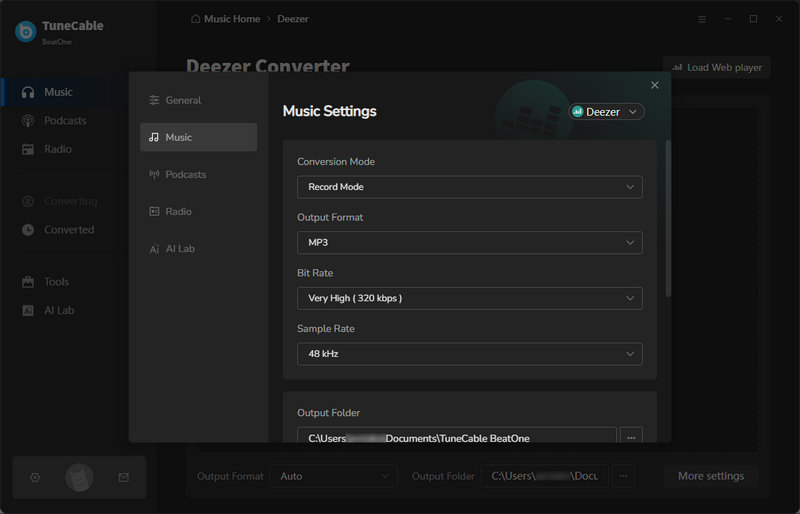
Step 2 Return to the TuneCable interface and click the settings button. At this time you can set some basic settings, such as conversion mode, output format, bit rate, sample rate, etc. You can also modify the output folder here. If you want to save the lyrics then you can click on Save lyrics (if provided).
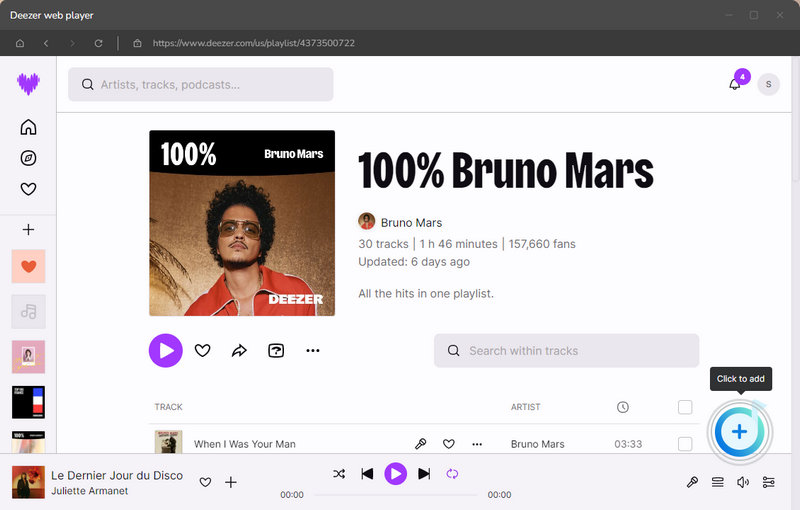
Step 3 After modifying all the settings, please return to the Deezer web player again. At this point, please select the Deezer song, playlist, or album you want to download and click to open it. You will see the button at the bottom right corner turns blue, when you click it, TuneCable will automatically load all the songs on the current page. You can unclick the songs you don't want and click Add.
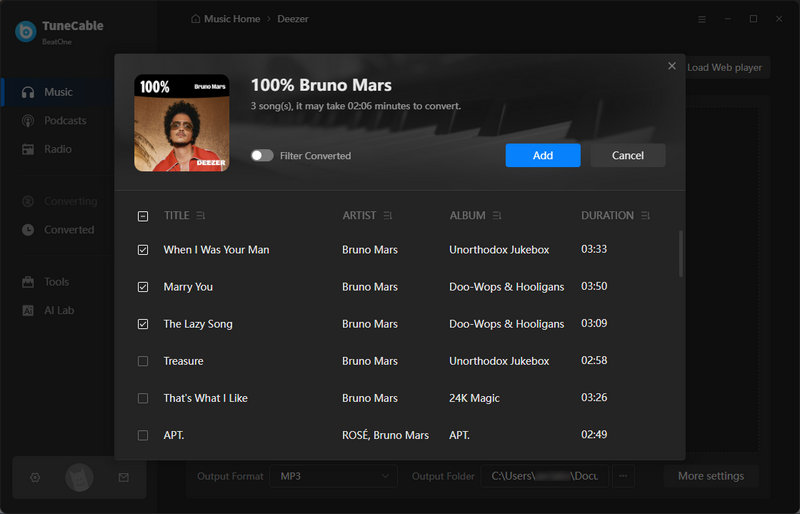
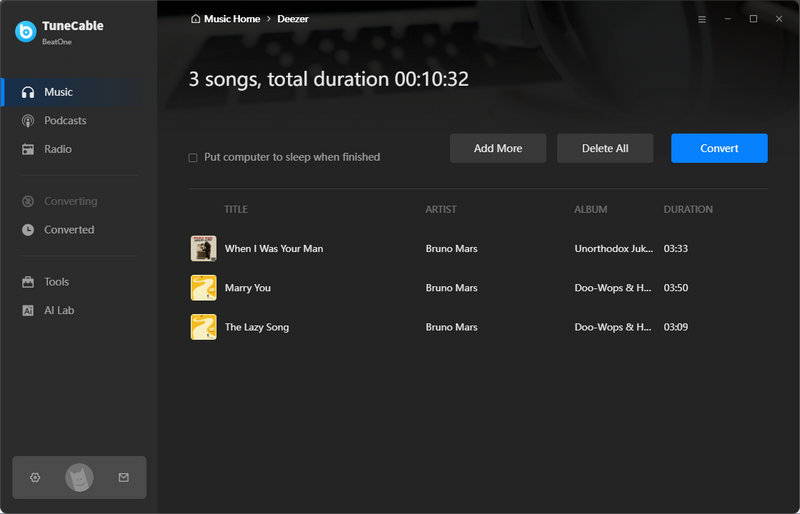
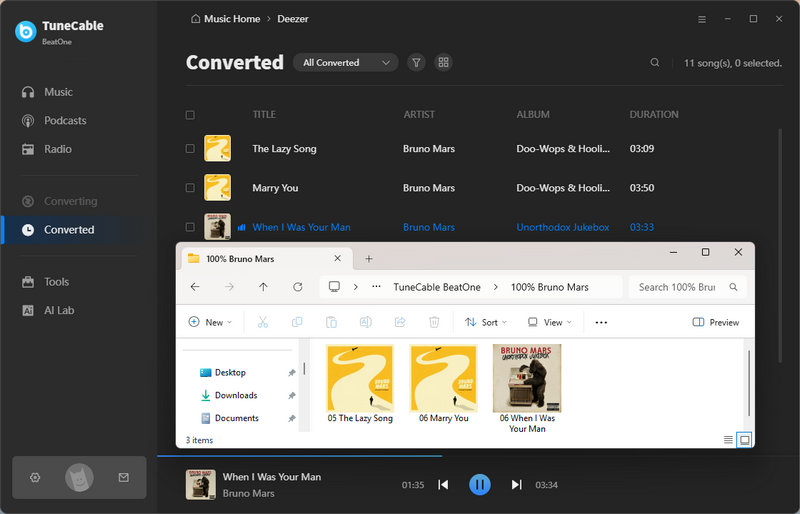
Step 4 If you want to continue adding Deezer music, then you can click Add More and continue repeating the previous steps. If you have added all the songs, then click Convert to start converting the music. Just wait a few moments for TuneCable to finish downloading the songs. Then the folder containing the downloaded songs will automatically pop up for you to view.
| 😄 Pros: | 😭 Cons: |
|---|---|
| Support multiple platforms such as Deezer, Spotify, Apple Music, Tidal, Amazon Music, YouTube, YouTube Music, etc. | Only available on Windows or Mac. |
| Download songs, albums, playlists, podcasts, radio, and audiobooks. | |
| Batch download music at up to 10x speed. | |
| Multiple output formats including MP3, AAC, WAV, FLAC, AIFF, and ALAC. | |
| Preserve the original audio quality and ID3 tags. | |
| Enjoy free offline playback on any portable device. |
Allavsoft is a multimedia software that can download movies, music, and subtitles, including Spotify, YouTube, Deezer, Qobuz, Soundcloud, Napster, etc. Based on our hands-on testing, its multi-functional nature is a great plus, but the downloading success rate is low.
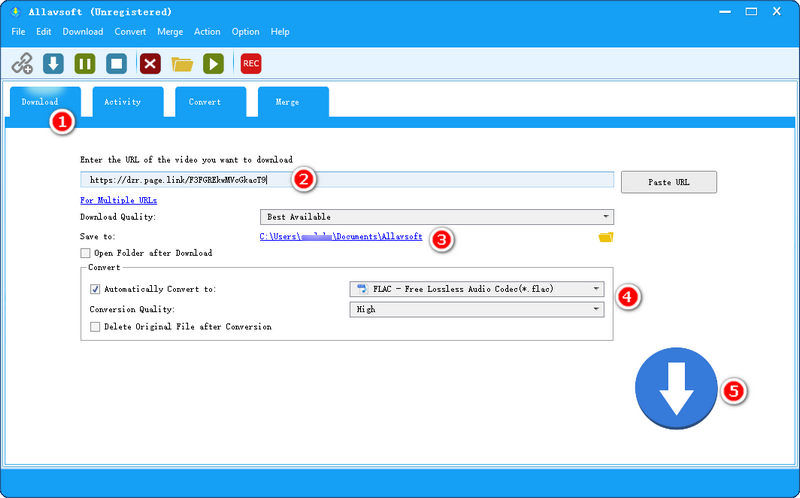
💡 How to Use Allavsoft to Download Deezer Music:
| 😄 Pros: | 😭 Cons: |
|---|---|
| Support formats compatible with many devices, such as Android, Apple TV, iPad, iPod, PS3, PSP, and so on. | Slow download speed. |
| Support downloading movies, music, and subtitles. | The UI design feels outdated, with text that is a bit small and less clear. |
| Cannot choose sample rates and bit rates. | |
| Batch URL parsing can be unstable. We often had to copy and paste links manually one by one. |
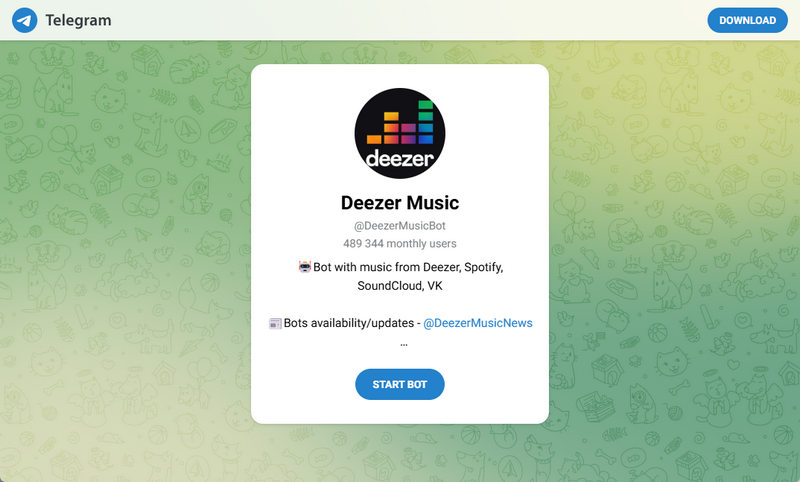
Telegram Bot is an automated application that runs on the Telegram messaging platform. Users can message or interact with these bots, and the robots will respond accordingly. However, these bots frequently go offline due to copyright strikes or API blocks by music streaming services.
💡 How to Download Music from Deezer via Telegram Bot:
| 😄 Pros: | 😭 Cons: |
|---|---|
| Compatible with computers, mobile phones, and tablets. | Output music in only MP3 format. |
| Capable of delivering up to 320kbps MP3 files, which satisfies daily casual listening based on our audio checks. | Cannot batch download. |
| Cannot choose sample rates and bit rates. |
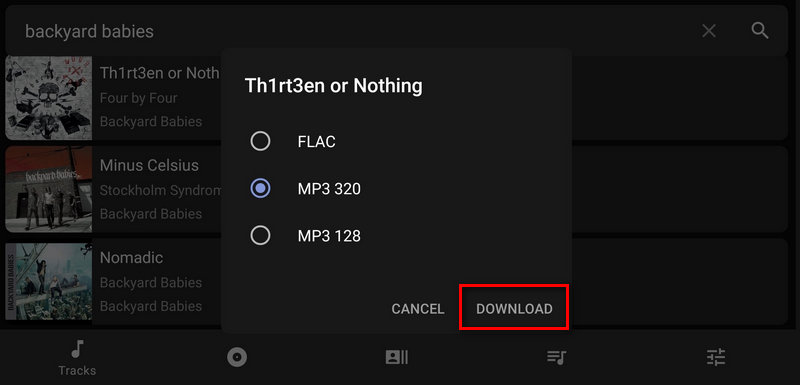
For mobile users seeking a Deezer downloader for Android, AIDS Deezer Downloader is a popular choice. This free Deezer downloader apk allows you to fetch music directly to your phone storage without a premium subscription.
💡 How to Use AIDS Deezer Downloader on Android:
| 😄 Pros: | 😭 Cons: |
|---|---|
| Free to use. | Only for Android users. |
| Support free Deezer users. | Songs can only be downloaded in MP3/FLAC format. |
| Slow download speed. |
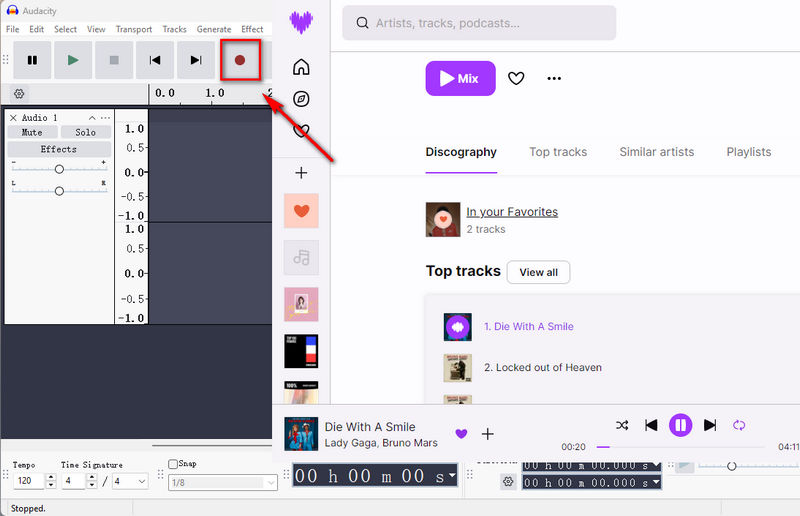
As veteran audio editors, we also recommend recording as a 100% foolproof workaround when direct downloaders fail. Audacity is an industry-standard, open-source audio recording and editing software compatible with Windows, macOS, and Linux. While it guarantees a way to capture any sound playing on your PC, it requires a steeper learning curve and a completely different workflow compared to standard music converters.
💡 How to Record Deezer Music with Audacity:
| 😄 Pros: | 😭 Cons: |
|---|---|
| Free to use. | Only available on Windows or Mac. |
| Can only record at 1x speed. | |
| Audio quality depends on your sound card and can be interrupted by computer system sounds or notifications. | |
| Only download Deezer music in MP3 at 128kbps. |
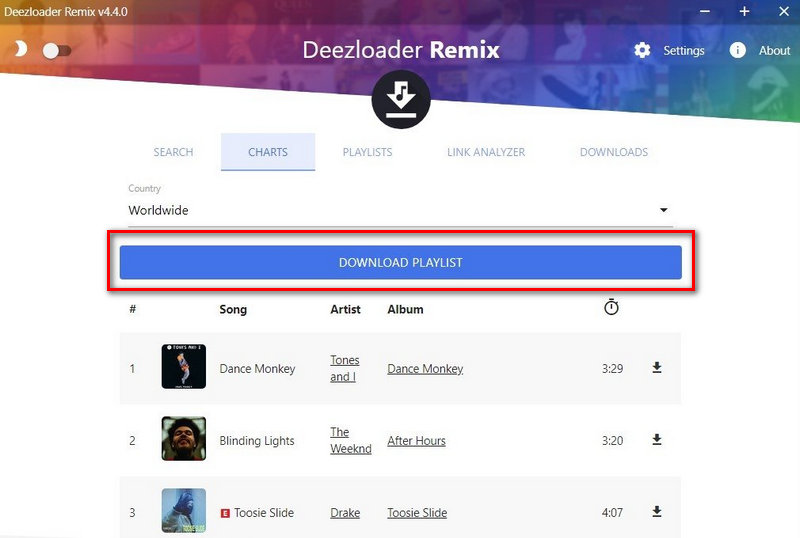
Deezloader Remix was once a legendary free software for downloading Deezer tracks and full albums. However, we must note that the original Deezloader Remix project has been discontinued by its developers. While some community-patched versions still float around the web to download MP3 or FLAC files, users will frequently encounter token errors and broken search features due to a lack of official support.
💡 How to Download Deezer Playlists via Deezloader Remix:
| 😄 Pros: | 😭 Cons: |
|---|---|
| Free to use. | Songs can only be downloaded in MP3/FLAC format. |
| User-friendly interface. | Slow download speed. |
| Support downloading Deezer songs, albums, and playlists. | Cannot choose sample rates and bit rates. |
To help you easily pick the most suitable Deezer music downloader, we have summarized the key features of these 6 tools. Check out the comparison table below to find out which Deemix alternative best fits your needs.
| Supported Platforms | Supported Devices | Output Format | Download Speed | Audio Quality | |
| TuneCable BeatOne | Deezer, Spotify, YouTube, Apple Music, Tidal, Amazon Music, YouTube Music, etc | Windows, Mac | MP3, AAC, WAV, FLAC, AIFF, ALAC | 10x | Hi-Fi |
| Allavsoft | Deezer, Spotify, YouTube, Qobuz, Soundcloud, Napster, etc | Windows, Mac | Formats compatible with many devices, such as Android, Apple TV, iPad, iPod, PS3, PSP, and so on | Slow | Cannot choose sample rates and bit rates |
| Telegram Bot | Deezer | Computers, mobile phones, and tablets | MP3 | Fast | Up to 320 kbps |
| AIDS Deezer Downloader | Deezer | Android | MP3, FLAC | Slow | Up to 320 kbps |
| Audacity | Deezer | Windows, Mac | MP3 | 1x | 128 kbps |
| Deezloader Remix | Deezer | Windows, Mac | MP3, FLAC | Slow | Cannot choose sample rates and bit rates |
Most tools output MP3. For FLAC, TuneCable BeatOne, Deezloader Remix, and AIDS Deezer Downloader support it.
TuneCable BeatOne has the most user‑friendly interface and requires no command line or manual API setup. Allavsoft is also fairly easy, but its batch processing is less reliable. Audacity and Telegram Bot require more steps.
Open‑source tools often break after each Deezer update. TuneCable BeatOne are updated continuously, so downtime is minimal.
TuneCable BeatOne is currently available for Windows and Mac only. For Android users, AIDS Deezer Downloader is an option. Telegram Bot also works on mobile via the app.
In this article, we introduce why Deemix no longer works, provide 6 best Deemix alternatives, and make a quick comparison of them. In general, TuneCable BeatOne is a safe and professional Deemix alternative. It not only supports downloading music from Deezer but also supports many other different platforms, including Spotify, YouTube, Qobuz, SoundCloud, Apple Music, Tidal, etc. While retaining the original sound quality of Deezer, it can also download music at ten times the speed, saving users a lot of time. If you are tired of broken links and want to download Deezer music safely at lightning speed, TuneCable BeatOne is undoubtedly your best Deemix alternative. Click to download and give it a try!
 What's next? Download TuneCable BeatOne now!

Ava Morrison | Senior Writer
TuneCable BeatOne - All-in-one Music Solution

