
 >
How To >
Music Tips >
>
How To >
Music Tips >
Want to save your favorite YouTube Music or videos for offline playback? If you've been looking for a YouTube to MP3 converter, you might come across EzMP3. This popular online YouTube to MP3 converter promises a quick and free conversion from YouTube videos to MP3 files. But does it really work well, and is it safe to use? Many users report issues like EzMP3 not working or raise concerns about its reliability. In this EzMP3 review, we put EzMP3 to the test and explore several EzMP3 alternatives for converting YouTube videos to MP3. Let's have a look.
 Part 1. EzMP3 Review Part 2. Is EzMP3 Safe? User Feedback on EzMP3 Part 3. How to Fix EzMP3 Not Working Part 4. Alternatives to EzMP3 Part 5. A Comparison Table Between EzMP3 and Alternatives FAQs about EzMP3 Converter
 Website: https://ezmp3.co/
EzMP3 is an online YouTube downloader that converts videos from YouTube, SoundCloud, and Facebook into MP3 audio files directly in your browser, with no registration or software installation required. EzMP3 supports videos up to 12 hours in length and offers a range of bitrate options from 64 to 320 kbps for output audio quality. Additionally, it includes a built-in audio trimmer, allowing you to clip and save specific sections of a song. Conversions are generally quick and processed locally in your browser, keeping your files private during the conversion step.
| Pros | Cons |
|---|---|
| Completely free to use. | Does not support batch downloads for playlists. |
| Features a clean, ad-free, and simple interface. | The website domain changes frequently. |
| Offers multiple audio quality options up to 320 kbps. | Limited to MP3 output format. |
| Includes a built-in audio trimming tool. | Experiences occasional slow processing and requires human verification. |
| Supports conversion of very long videos. | Lacks official customer support and has regional access blocks. |

Get your videos and music from YouTube/YouTube Music instantly! TuneCable BeatOne downloads files in original quality with a single click.
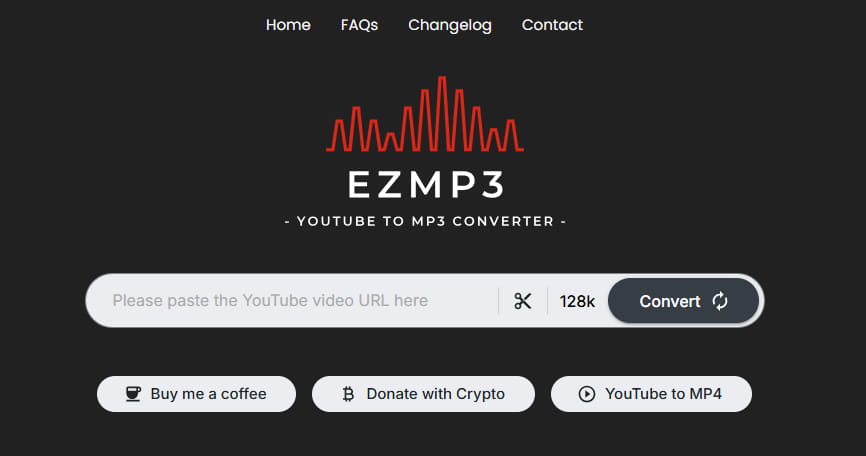
When considering any online YouTube to MP3 converter, safety is a paramount concern. So, is EzMP3 safe? The answer is nuanced.
On the surface, EzMP3 presents a cleaner experience than many similar tools. There are typically no aggressive pop-up ads, and downloaded files are generally verified to be free of malware. User data isn't explicitly collected, as no account is required.
However, significant concerns persist. EzMP3 often experiences frequent domain changes and regional blocks, which can lead users to impersonator sites that pose real phishing risks. Therefore, while it is not inherently malicious, the ecosystem around it carries notable security and reliability pitfalls.
Feedback from users on platforms like Trustpilot and Reddit is polarized, highlighting a stark contrast between its promised simplicity and operational flaws.
Positive
Negative
Encountering issues with EzMP3 is one of the most common frustrations for users. Since this online YouTube to MP3 converter relies on web-based scraping that conflicts with YouTube's frequent anti-download updates, errors are unfortunately common. If your YouTube to MP3 download has stalled, don't immediately switch to an EzMP3 alternative. Instead, work through these practical troubleshooting steps to get EzMP3 functional again.
FIX 1 Verify the website and link. First, ensure you’re using a genuine and current EzMP3 URL, as the domain changes often. Try visiting known working addresses. Next, double-check the YouTube link you pasted. Links to private, age-restricted, or region-blocked videos will fail. Test with a different, publicly available video to isolate the problem.
FIX 2 Perform a hard refresh and clear cache. Your browser may be loading an outdated or corrupted version of the site's script, causing buttons to freeze. Perform a hard refresh by pressing Ctrl + F5 (Windows) or Cmd + Shift + R (Mac). If the issue persists, clear your browser's cache and cookies for the site, which often resolves conversion or download glitches.
FIX 3 Try a different browser or network. Sometimes, the issue is local to your browser due to a conflicting extension or setting. Try opening the EzMP3 site in an alternate browser (e.g., switch from Chrome to Firefox or Edge) with extensions disabled. Additionally, network firewalls or VPNs can interfere. Temporarily disable your VPN or try a different internet connection to see if the YouTube to MP3 download process initiates.
FIX 4 Wait and retry during off-peak hours. As a popular free YouTube to MP3 service, EzMP3 servers can become overloaded, leading to timeouts or failed conversions. If you’re not in a rush, try again later, preferably during off-peak hours. Patience is often the simplest fix for server-side issues.
If you have methodically tried all steps above and EzMP3 remains unresponsive, the problem is likely with the service itself and is out of your control. It's a clear sign to explore stable and feature-rich alternatives. Read on to select the best YouTube to MP3 converter that is suitable for you.
Given the recurring safety concerns and operational instability of EzMP3, it's wise to consider more reliable options. The following EzMP3 alternatives are also popular among users seeking a consistent YouTube to MP3 converter. There's bound to be one that suits your needs.
TuneCable BeatOne is a versatile desktop application that enables you to download and convert music, podcasts, audiobooks, and music videos from a wide range of streaming services, including YouTube, YouTube Music, Spotify, Apple Music, Tidal, SoundCloud, and more. It supports popular formats including MP3, AAC, WAV, FLAC, AIFF, ALAC, and MP4, ensuring your files are compatible with most devices and players. You can preserve original audio quality and metadata while converting entire YouTube playlists to MP3 quickly in batches. In addition, TuneCable includes many useful extra features, such as a tag editor, format converter, AI audio splitter, and CD burner. All of them are presented in a clean, ad-free interface that prioritizes ease of use and security.

TuneCable BeatOne
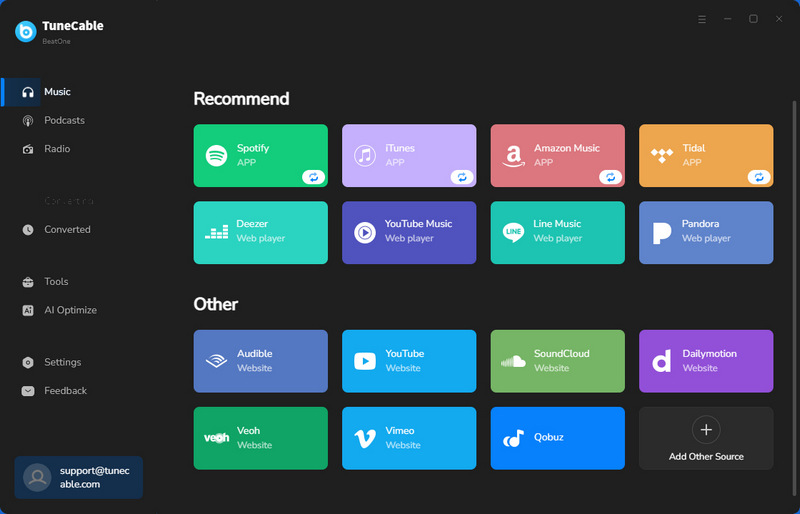
Step 1 Launch TuneCable BeatOne and select "YouTube Music" from the main menu. Log in to your YouTube Music account when prompted. TuneCable works with both free and premium accounts.
Note: Choose "YouTube Music" for songs and playlists from that service, which typically provides better audio quality and full metadata. If you prefer to extract audio from a regular YouTube video, select the "YouTube" option instead.
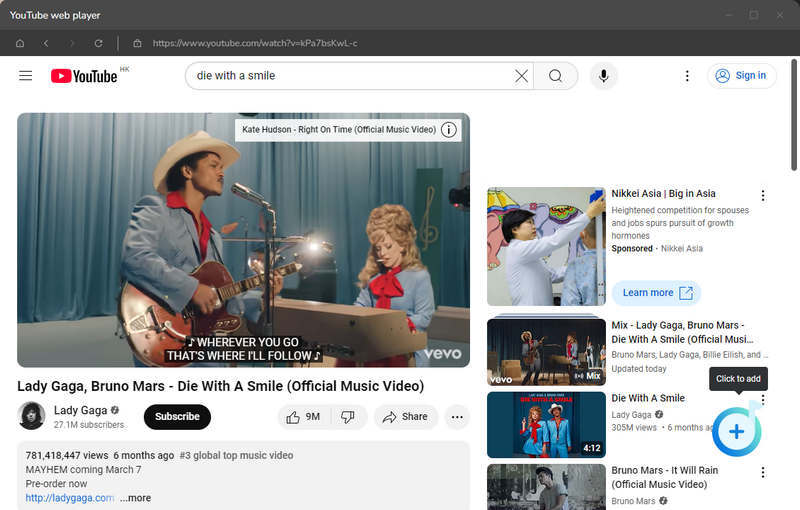
Step 2 Use the built-in YouTube web player to browse and find the tracks, albums, or playlists you want to save. When ready, click the blue "Click to add" button to load your selection into a list, check the specific songs you wish to convert, and press "Add". You can repeat this with the "Add More" feature to download multiple songs or playlists.
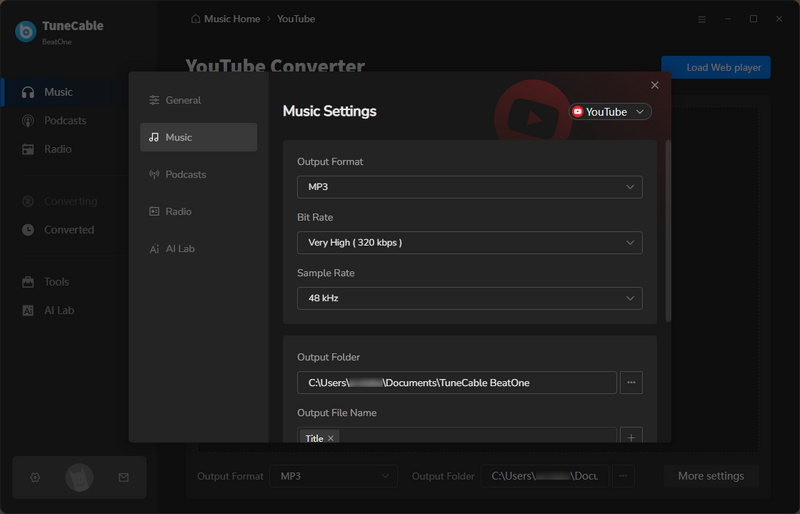
Step 3 Click the "Settings" button to customize your output settings. Select MP3 as your output format. You can also customize related options such as conversion mode, bit rate, sample rate, output folder, and output file name, etc, to suit your needs.
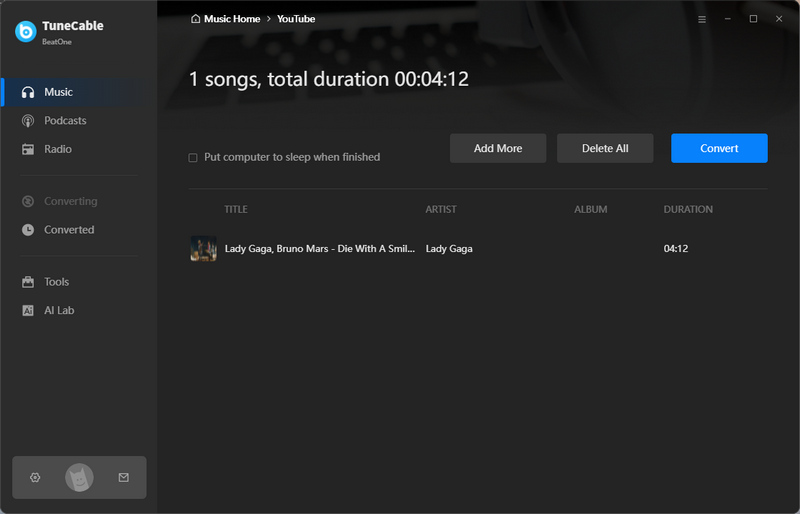
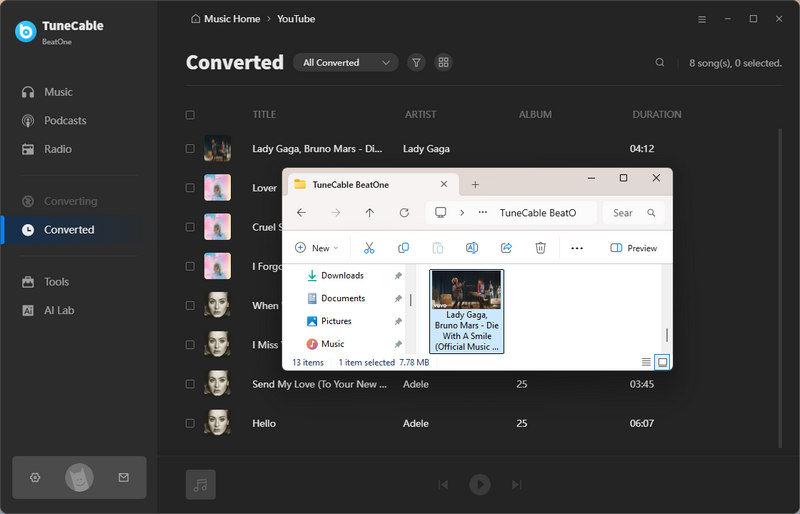
Step 4 Once your settings are configured, click the "Convert" button to start the conversion process. When finished, all successfully converted files will appear in the "History" section.
Pros and Cons:
| Pros | Cons |
|---|---|
| Converts YouTube to MP3, AAC, WAV, FLAC, AIFF, ALAC, and MP4. | Only available for Windows and macOS. |
| Supports batch downloads of tracks and videos. | |
| Customizable output settings with original quality preserved. | |
| Retains ID3 tags and lyrics. | |
| Up to 10x faster conversion speed. | |
| Includes free utilities like CD Burner, Tag Editor, and AI Audio Splitter. |
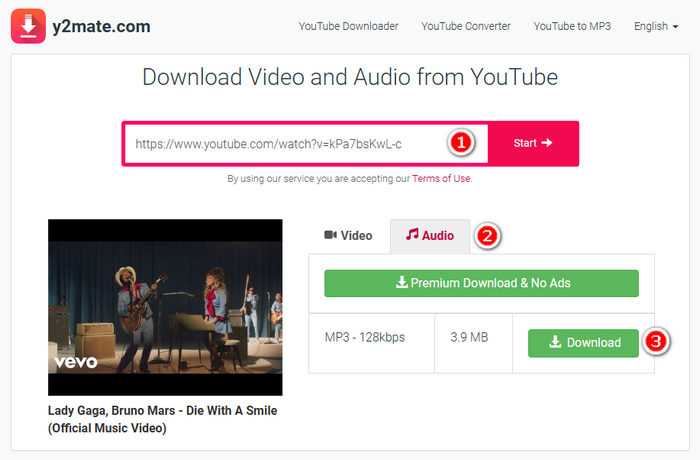
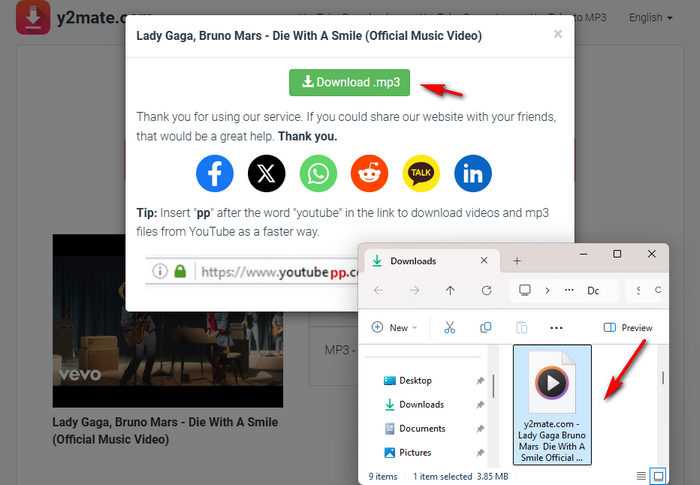
Y2Mate is a widely used online YouTube to MP3 converter that allows you to download videos from YouTube, Facebook, Instagram, and other sites. Y2Mate enables you to select your preferred format, such as MP4 for video or MP3 for audio, along with the desired quality options. Its simplicity and free access make it a popular choice for users looking to keep videos or audio tracks available offline.
Pros and Cons:
| Pros | Cons |
|---|---|
| Free to use. | Displays frequent and intrusive ads. |
| No YouTube account required. | The download speed can be slow or inconsistent. |
| Supports MP4 video and MP3 audio downloads. | All buttons will jump to the ad page when clicking the first time, and you need to go back and re-click the second time. |
| Offers adjustable quality options. | When downloading MP3 format, you can only download 128kbps, and you can't select any other bitrate. |
| No batch conversion & no cover downloaded with the song. |
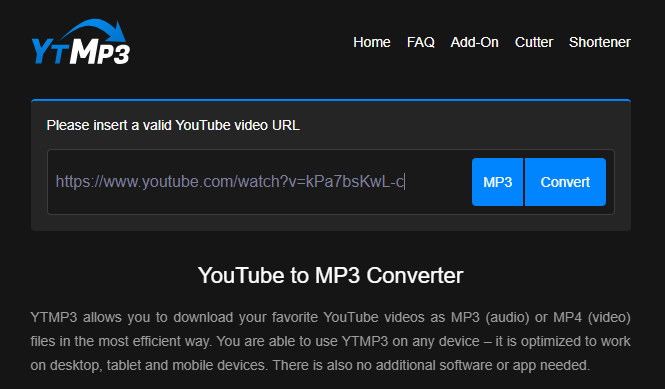
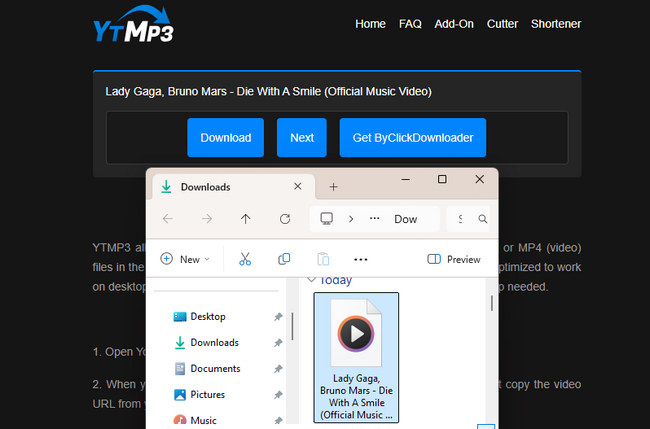
YTMP3 is a free online YouTube to MP3 converter that allows you to extract and download audio from YouTube videos as MP3 files directly to your computer. No app installation or account login is required. This makes it convenient for users to listen to YouTube content offline on various devices. However, be aware that the site often displays pop-up ads and may redirect you to promotional pages during use.
Pros and Cons:
| Pros | Cons |
|---|---|
| Free and easy to use. | Frequent ads and page redirects. |
| Compatible with most devices. | No option to choose the bit rate. |
| No account or installation needed. | Does not support batch downloads. |
| Supports MP3 and MP4 formats. | Does not include cover art with audio files. |
| Frequently changes domain names. |
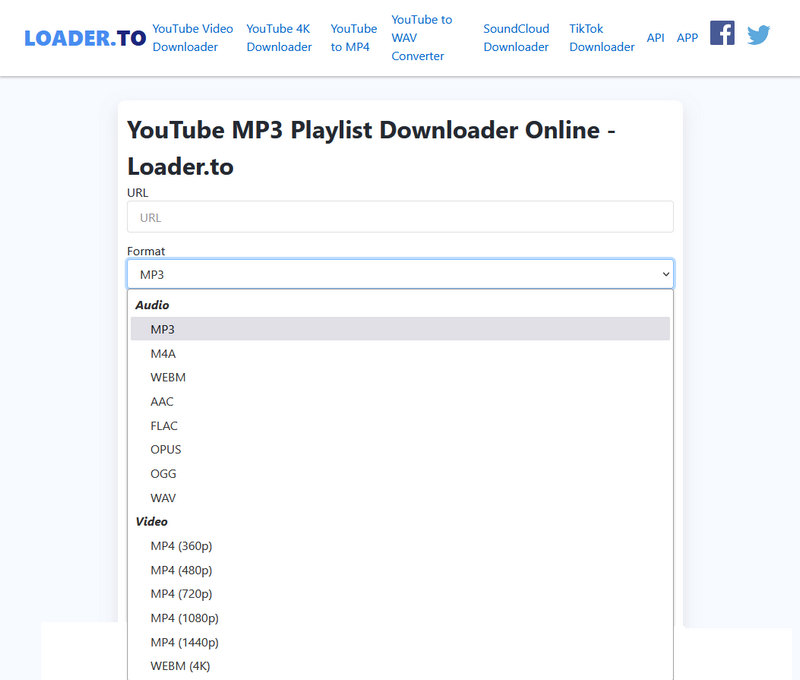
Loader.to is a free web-based media downloader that allows users to convert and save videos and audio from various platforms, including YouTube, SoundCloud, Facebook, and TikTok. Accessible without installation or registration, it supports multiple audio formats such as MP3, FLAC, M4A, and WAV, and video downloads in MP4 up to 2K resolution. Loader.to allows users to download entire YouTube playlists in bulk, offering a quick way to save multiple tracks at once.
Pros and Cons:
| Pros | Cons |
|---|---|
| Free to use with no account required. | It triggers ads, pop-ups, and redirects to suspicious websites. |
| No software installation needed. | Batch playlist downloading is only possible with installed software. |
| Supports batch downloading of YouTube playlists. | Audio quality is inconsistent, which does not match the stated 320 kbps bitrate. |
| Offers output formats including MP3, FLAC, M4A, WAV, and MP4. | Downloaded files lack essential ID3 metadata. |
| Works on multiple platforms, including YouTube, TikTok, and SoundCloud. |
To help you quickly compare these alternatives and choose the tool that best fits your priorities, here is a detailed breakdown of their key features
| Music Platforms | Output Format | Ad-Free | Batch Download | Cover Art | Bit Rate | Safety | |
| EzMP3 | YouTube | MP3 (& MP4 with EzMP4 service) | ✔️ | ❌ | ❌ | Up to 320 kbps | ⭐⭐⭐ |
| TuneCable BeatOne | YouTube, YouTube Music, Spotify, Apple Music, Amazon Music, Tidal, Deezer, SoundCloud, Dailymotion, etc. | MP3, MP4, AAC, WAV, FLAC, AIFF & ALAC | ✔️ | ✔️ | ✔️ | Up to 320kbps | ⭐⭐⭐⭐⭐ |
| Y2mate | YouTube, Facebook, and Dailymotion | MP3 & MP4 | ❌ | ❌ | ❌ | 128kbps | ⭐⭐ |
| YTMP3 | YouTube | MP3 | ✔️ | ❌ | ❌ | 192kbps | ⭐⭐ |
| Loader.to | YouTube, Facebook, Vimeo, SoundCloud, Twitter, and TikTok | MP3, M4A, FLAC, OPUS, OGG, WAV & MP4 | ✔️ | ✔️ | ❌ | Up to 320kbps | ⭐⭐ |
Yes. It operates as a free YouTube to MP3 service without requiring users to pay for a subscription. The site typically stays online through optional user donations.
No, unfortunately not. One of the main limitations of EzMP3 is that it only supports single-video conversion. For those looking to download entire playlists, you would need to find a dedicated YouTube to MP3 converter that offers batch download functionality, such as TuneCable.
As a free online YouTube to MP3 converter, it can experience server overload, legal challenges, or temporary blocks, which may lead to downtime. Additionally, the site frequently changes domains, so old bookmarks or links may no longer function. Finally, EzMP3 cannot download YouTube videos that are private, age-restricted, or blocked in certain regions, which can also prevent it from working as expected.
The primary reason for constant domain changes is to avoid legal takedowns related to copyright infringement. This is a common tactic among free online YouTube to MP3 converter sites operating in legal gray areas. It's crucial to ensure you are on the legitimate current domain to avoid fake copycat sites that could pose security risks.
Trust depends entirely on the specific tool. Services like EzMP3 present a mixed picture. While security analyses of some domains show a reasonable trust score and the interface itself may be ad-free, the broader ecosystem is risky. Such sites are often surrounded by legal uncertainty, may be used for data tracking, and their frequent domain changes can lead users to dangerous impersonator sites. For complete trust, consider safer alternatives like TuneCable.
This article provides a detailed EzMP3 review and offers several alternatives for converting YouTube to MP3. For a truly dependable way to preserve your favorite audio, turn to TuneCable BeatOne. It reliably converts full playlists, retains original quality and metadata, and works securely from your desktop. Download TuneCable and build your own reliable music library now!
 What's next? Download TuneCable BeatOne now!

Ava Morrison | Senior Writer
TuneCable BeatOne - All-in-one Music Solution

