
TuneCable iMazon Recorder
 >
How To >
Amazon Music Tips >
>
How To >
Amazon Music Tips >
Spatial audio is a technology that creates a three-dimensional sound field, making audio feel as though it surrounds the listener. It allows listeners to perceive sound coming from above, in front, behind, and from every direction around them. Major streaming platforms, such as Apple Music, Tidal, and Amazon Music, now utilize this technology to deliver an immersive audio experience for their users. However, many people still don't know how to find and download spatial audio music for offline listening. This article will break down the process in detail, providing a step-by-step guide.
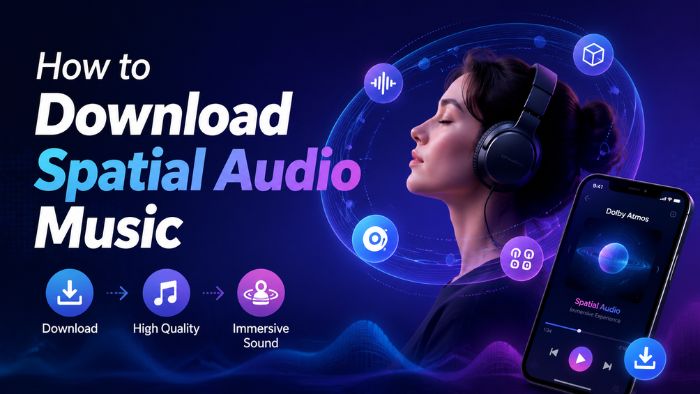
While stereo music offers only a flat, two-dimensional soundstage across left and right channels, spatial audio music delivers depth and dimension by utilizing multichannel and object-based audio technologies, employing specific 3D encoding formats—such as Dolby Atmos and 360 Reality Audio.
Dolby Atmos and 360 Reality Audio are two popular immersive audio formats that bring a new dimension. By adding height to the soundstage, they make music and movies feel like they're happening all around you from different directions.
| Dolby Atmos | 360 Reality Audio | |
|---|---|---|
| Core Technologies | Object-based immersive audio | Object-based immersive audio |
| Sound Space | Around and above the listener (cinematic 3D sound experience) | Surrounding the listener in a 360° sonic environment |
| Typical File Identification | E-AC-3 JOC, EC-3, TrueHD | MPEG-H 3D Audio |
| Common Container | MP4/M4A, MKV, M2TS | MP4/M4A, MPEG-H containers |
| Application Scenarios | Film, television, games, and music | Primarily used in the music industry |
| Common Streaming Support | Apple Music, Amazon Music, TIDAL, etc. | Amazon Music, TIDAL, nugs.net, etc. |
It's clear that both Dolby Atmos and 360 RA can create a more realistic and engaging sound experience. However, streaming spatial audio is not always practical, which is why many listeners choose to download spatial audio music for offline listening.
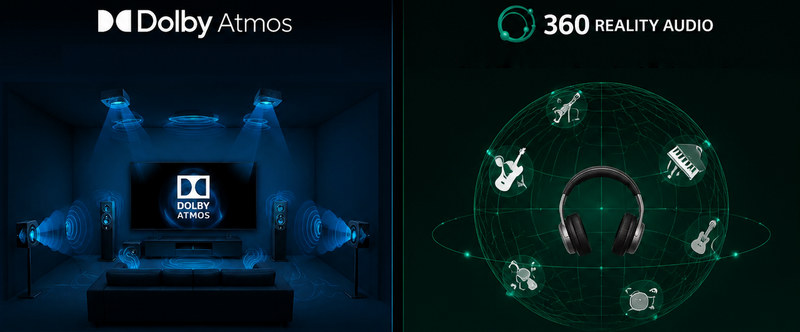
Next, we'll cover three main ways to download spatial audio music: downloading tracks through a streaming platform subscription, purchasing individual tracks for permanent ownership as local files, or using third‑party tools to obtain Dolby Atmos content in EAC3 or AC4 format.
Nowadays, a growing number of music platforms, including Apple Music, Amazon Music, and Tidal, offer spatial audio features to their subscribers. If you have paid for these services, tracks in spatial audio are easy to find within their mobile music apps. Here is how to stream and download spatial audio music on these platforms:
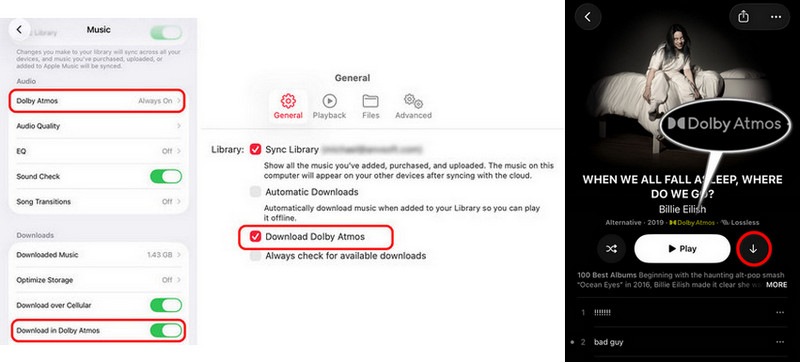
Apple Music enables users to listen to select songs in spatial audio with Dolby Atmos. It is supported on iPhone, iPad, Mac, Apple Vision Pro, Apple TV, Android, and Windows PC. Paired with AirPods Pro, the head tracking feature takes the spatial audio experience to a whole new level.
Spatial audio on Tidal is delivered via Dolby Atmos Music. Notably, Dolby Atmos playback is not supported on desktop or Pixel devices and is only supported on some mobile devices.
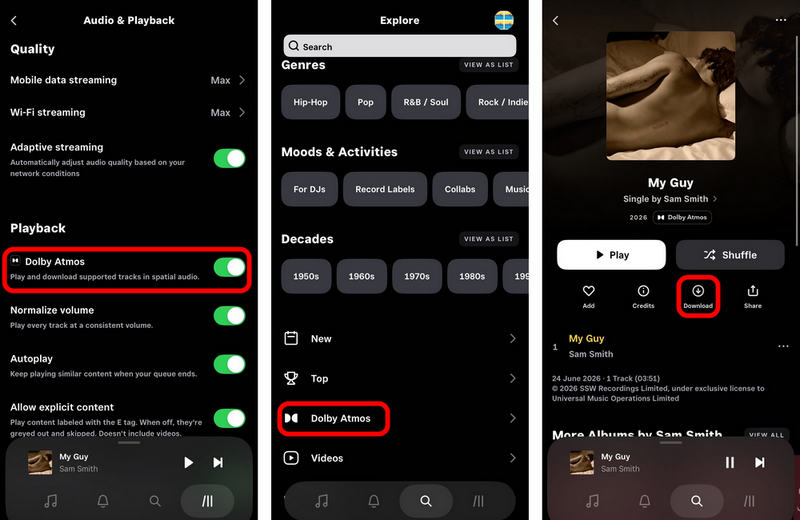
Amazon Music Unlimited subscribers are able to access tracks mastered in Dolby Atmos and 360 Reality Audio. Spatial audio is supported on the Amazon Music app on some iOS devices, Android devices, or Fire TVs.
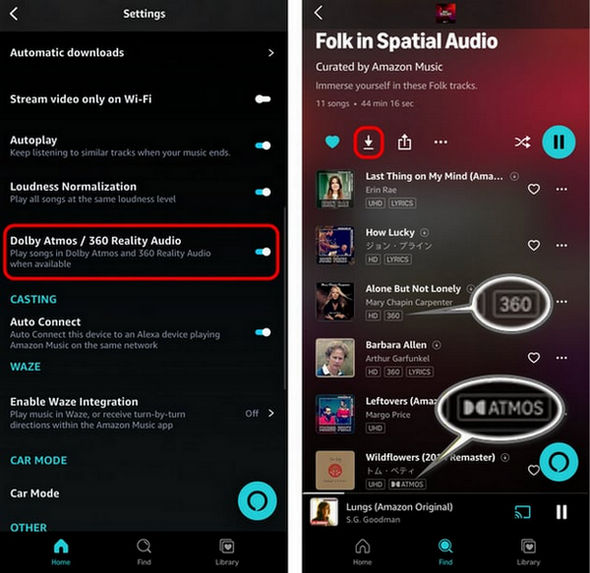

Want to download spatial audio music for offline listening on any device? TuneCable iMazon Recorder allows you to batch download and save Dolby Atmos audio from Amazon Music to the local PC. It preserves ID3 tags, metadata, album artwork, and playlists, making it easy to build and manage your personal music collection.
The prerequisite for streaming and downloading Dolby Atmos tracks on major music platforms is to pay for the streaming plans. The downloaded spatial audio music is saved as a cache file and is only playable within the music app. That said, the ownership of the music actually does not belong to the subscribers. However, some prefer to make a one-time payment for the track and gain full control through a spatial audio file download.
Here are some online digital music stores where you can buy spatial audio:
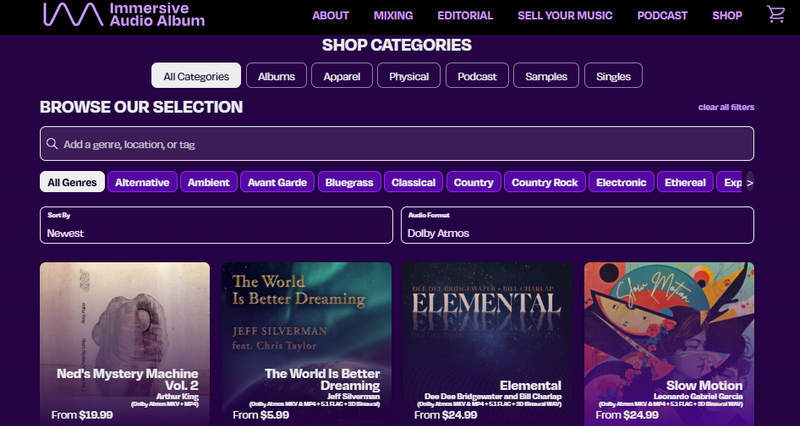
IAA is an online store specializing in immersive audio albums, allowing users to directly purchase and truly own music. To be compatible with different devices, it typically offers multiple download formats for a spatial audio file download, such as Dolby Atmos MKV & MP4, 5.1 FLAC, and 3D Binaural WAV.
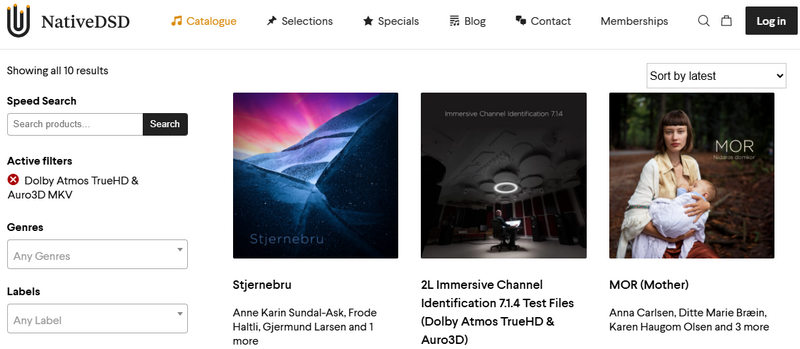
NativeDSD is another popular spatial audio online market. This platform directly obtains DSD Edit Master files from record companies after they've finished recording in the studio, ensuring that the audio data is uncompressed and unconverted. It offers a wide variety of download formats, including DSD, DXS, MKV (Dolby Atmos TrueHD), FLAC, and more.
We introduced two ways to get spatial audio music in the previous sections: either by subscribing to a music platform service or by purchasing a single track or album with a one-time payment. Yet there's also a third option: using a download tool to get the spatial audio file. Which method works best? We've put together this comparison table.
| Streaming Platforms | Buying | Spatial Audio Music Downloader | |
|---|---|---|---|
| Ownership | Temporary ownership | Permanent ownership | Permanent ownership |
| Output Format | EAC3, AAC | MKV, FLAC, WAV, DSD, DXD | EAC3, AC4 |
| Music Library Catalog | A massive, up-to-date library of popular music | A curated selection of audiophile favorites, classic albums, and releases from specific labels | Extensive catalog, synced in real time with streaming platforms |
| Playback Compatibility | Only within the Music mobile app | Require a Blu-ray player, a high-end TV, or an AV receiver to play files in specific formats (e.g., Dolby Atmos TrueHD/MKV). Limited on ordinary mobile phones and computers. | Require third-party playback software (such as VLC or Kodi) to play the spatial audio downloads. |
| Cost & Value for Money | Monthly/yearly subscription | One-time payment | Subscription or one-time purchase |
| Best For | Users who prefer new songs or popular songs on major music platforms | Users who prefer to collect high-quality immersive audio | Users who want to batch download spatial audio music from streaming platforms or who want to download tracks as local files at a low cost |
Although purchasing DRM-free spatial audio from IAA or NativeDSD ensures permanent ownership, the costly per-track/album pricing can be a significant financial burden for enthusiasts who want to build a massive music library. While streaming services like Apple Music or Amazon Music are cheaper, their cached files are saved within the official music app, and once the subscription is cancelled or expires, the downloaded music is unavailable.
The table above clearly indicates that a spatial audio music downloader is, comparatively, the better option. It allows you to enjoy the massive library of tens of millions of spatial audio tracks on streaming platforms while enabling permanent, unencrypted storage of these Dolby Atmos tracks on your local hard drive.
So how exactly does it work? Next, we'll use Amazon Music as an example to show you how to download original Dolby Atmos music files to the local PC.
TuneCable iMazon Recorder is a professional spatial audio music downloader, which can convert songs, playlists, or albums from Amazon Music to Dolby Atmos formats like EAC3 and AC4. Additionally, this tool supports downloading Amazon Music songs in lossless Ultra HD quality. To help users manage downloaded files efficiently, it also features retaining ID3 tags and lyrics after conversion. Plus, it's also a time-saving downloader that enables downloading Amazon Music tracks to the local computer at up to 10x speed. With it, you can easily download spatial audio from Amazon Music's vast and ever-updating music library for permanent offline playback.
TuneCable iMazon Recorder
Step 1 Start TuneCable iMazon Recorder and Choose Amazon Music Web Player
Click the download source switch button in the upper left corner and select "Amazon Music web player". Then log in to an Amazon Music Unlimited account.

Step 2 Change the Output Format to EAC3 or AC4
Click the "Settings" button to set the output format to EAC3 or AC4. Additionally, you can customize the output path, file naming convention, conversion mode, etc.
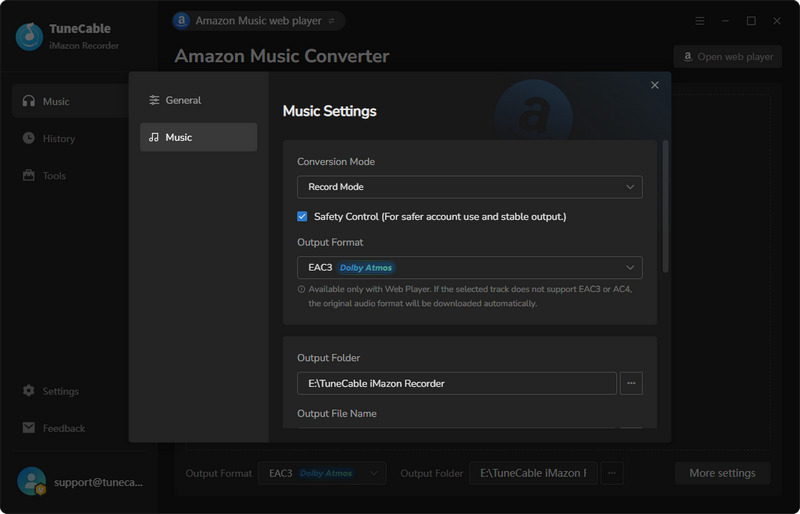
Step 3 Add the Desired Amazon Music Spatial Audio to Download
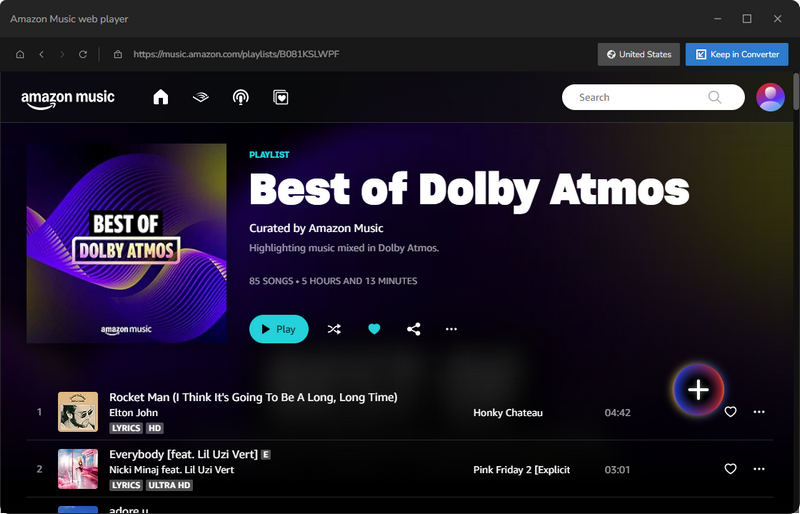
In Amazon Music web player, find the tracks, playlists, or albums that support Dolby Atmos, click the "+" button, select the tracks you want to download, and click "Add".
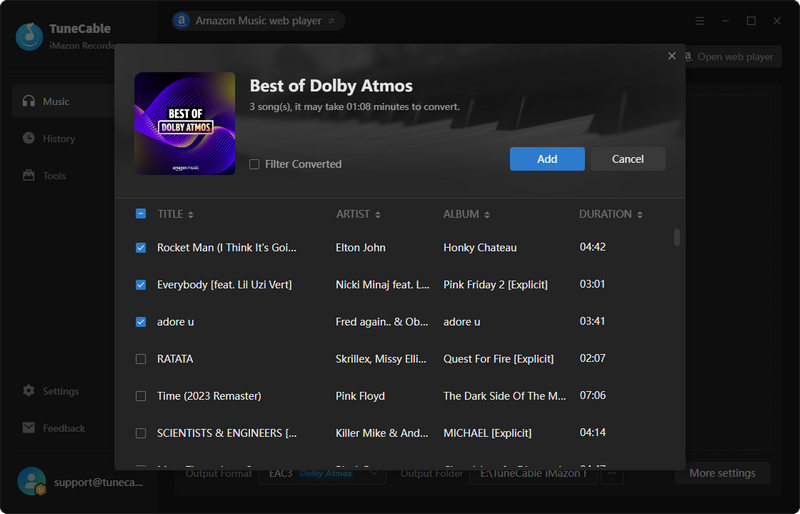
Step 4 Convert Amazon Music Spatial Audio to Local Files
Click the "Convert" button to start the spatial audio download.
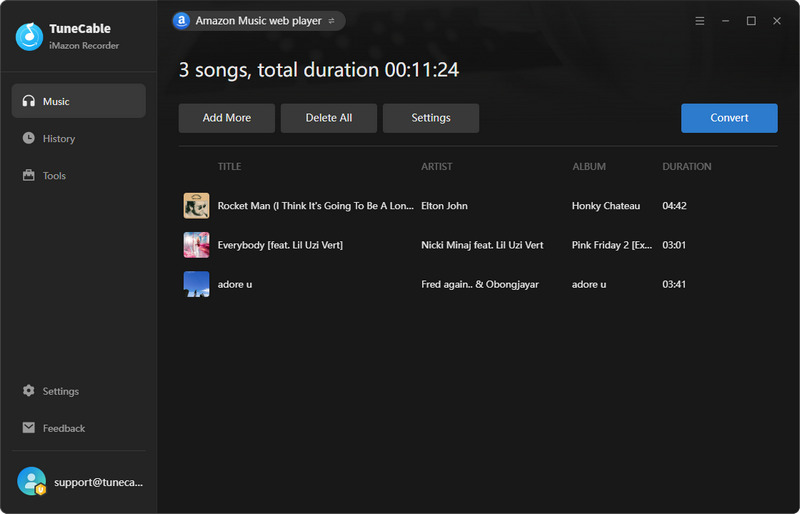
Step 5 Play the Downloaded Dolby Atmos Songs Offline
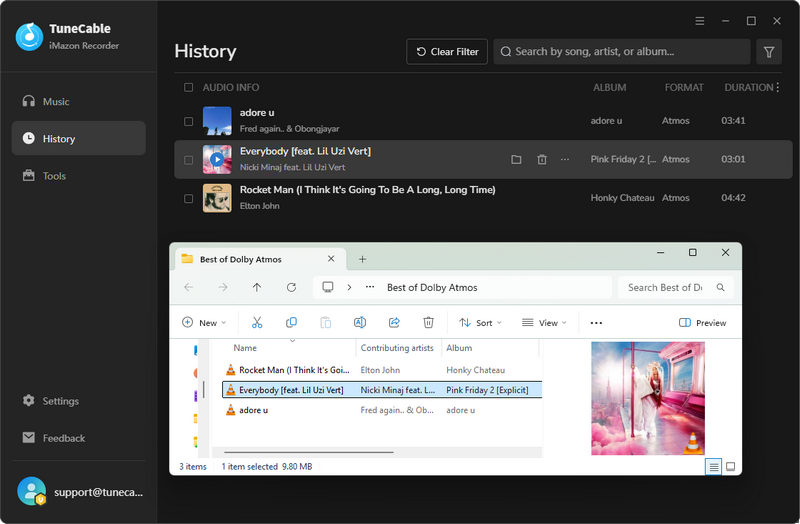
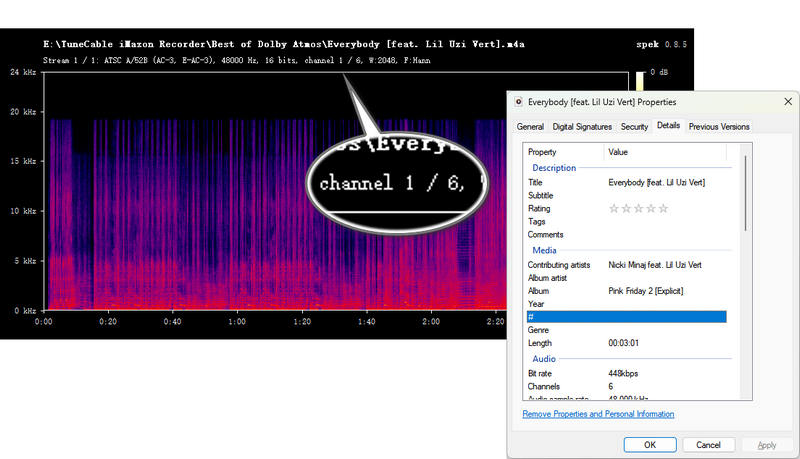
After the download is complete, you can go to the "History" module to view and play all the downloaded Amazon Music spatial audio files.
Yes. Most spatial audio formats rely on software processing to deliver a 3D sound field. Therefore, not all spatial audio requires specialized headphones for listening. However, compatible models like AirPods Pro or Beats with Spatial Audio support can provide a more immersive experience.
Yes. Currently, music players such as Foobar2000, VLC, and Windows Media Player support playing spatial audio files. However, they only act as decoders. It doesn't mean you'll get the full 3D effect after decoding the files. You may also need a software setup (e.g., Dolby Atmos app on Windows PC) that can properly render the spatial audio.
Spatial Audio playback is supported on smartphones (iPhone, iPad), computers(Mac or Windows PC), speakers, and home theater systems.
This article introduces three ways for downloading spatial audio. The first is to subscribe to a music streaming service and download tracks for offline playback within the music app. The second is to purchase spatial audio files online via a one‑time payment and save them as local files. Both approaches have their pros and cons: streaming subscriptions give you access to a vast library, while one‑time purchases offer greater flexibility and long‑term ownership. However, neither is particularly budget‑friendly in the long run.
The third approach offers a more cost‑effective alternative. Using tools such as TuneCable iMazon Recorder, you can download Amazon Music tracks that support spatial audio and save them as local EAC3/AC4 files while your subscription is active. This gives you more flexibility than a standard subscription and is more affordable than buying tracks individually. We hope this article helps you choose the option that best fits your needs.
 What's next? Download TuneCable iMazon Recorder now!

Ava Morrison | Senior Writer


 Switch to Mac